kanbanr
A kanban board that is the system of record for Claude-driven development. Claude manages it
through a skill that drives the kanbanr CLI, and a read-only web monitor
shows what is happening live while you work.
The CLI writes the local data folder directly — the single writer, no server, no login.
kanbanr serveruns a read-only view daemon over the same folder, with the monitor built into the binary. Sharing happens through a git remote. It is one binary, and Docker is optional.
Why this exists
An AI agent doing real project work needs a durable, external system of record — not an in-session scratchpad. Without one, the plan, the reasoning and the evidence live only in a transcript: they vanish between sessions, cannot be reviewed, and work gets built that nobody agreed to.
kanbanr keeps all of it in plain, git-backed files a human can read, and makes Claude keep it current as part of doing the work rather than as an afterthought.
What it commits to — work items link these by id:
| G-1 | A session recovers the full plan and continues, with no human recap |
| G-2 | Every work item records why it exists and how it will be verified |
| G-3 | Nothing substantial gets built before its reasoning is agreed |
| G-4 | Any line of code can be traced back to the requirement and goal it serves |
| G-5 | The tool stays low-friction enough that it is never worth bypassing |
| G-0 | The system stays operable and maintainable |
| G-6 | What is installed is what was built, and can be shown to be |
Where to start
- Installation — one command; the monitor is in the binary.
- Set up in 60 seconds — a board, from nothing.
- How the pieces fit — the CLI, the daemon and the data folder.
- The method — why an item exists, and what proves it done.
Constraints it works under
- Local-first: plain YAML and markdown in a git repo. No database, no accounts, no server required.
- The CLI is the single writer; the web monitor is read-only.
- Sharing happens through a git remote, which is also the access boundary.
- One binary, installable without a toolchain.
- Raw data is never discarded — it is captured as files and kept. Every summary, count and report is derived from it.
Installation
kanbanr ships as one binary. The CLI, the read-only web monitor and its assets are the same
executable — there is no separate UI to build and nothing to point serve at.
| What it is | How you get it | |
|---|---|---|
kanbanr | the CLI (single writer) and the web monitor (kanbanr serve) | one-line install, below |
| container image | the same binary in serve mode, for running the monitor somewhere else | docker pull, optional |
Neither needs a Rust toolchain. You only need one to build from source, which is the last section on this page.
Install
curl -fsSL https://github.com/startr-trade/kanbanr/releases/latest/download/install.sh | sh
On Windows (PowerShell):
irm https://github.com/startr-trade/kanbanr/releases/latest/download/install.ps1 | iex
The installer downloads the release build for your platform, verifies its SHA-256 against the
release’s own SHA256SUMS, and installs it — into /usr/local/bin when that is writable,
otherwise ~/.local/bin. It edits no shell profile and starts no daemon.
The one-liner is served from the release rather than from raw.githubusercontent.com on
purpose: the raw host is a CDN of the default branch, so it can hand out an installer that does not
match the release it is installing, and it rate-limits harder. From the release download host the
script and the binaries it fetches are one artifact set, versioned together.
Useful knobs:
# Pin a version instead of taking the newest release
curl -fsSL …/install.sh | sh -s -- --version v0.1.0

# Install somewhere specific
curl -fsSL …/install.sh | KANBANR_INSTALL_DIR=~/bin sh

# Lift the API rate limit when retrying (60 requests/hour anonymous -> 5000 with a token)
GH_TOKEN=$(gh auth token) curl -fsSL …/install.sh | sh
A token is sent only to api.github.com, which is the endpoint that rate-limits. The release
download host needs no credential and is never given one — an installer that forwards your token to
every host it touches is a worse trade than a slower retry.
If the install fails
raw.githubusercontent.com rate-limits and answers 429 Too Many Requests under load; so does
the GitHub API, at 60 requests an hour per IP without a token. Three ways around it, in the order
worth trying:
# 1. pin the version, which skips the release lookup entirely — the only path that needs no API call
curl -fsSL https://github.com/startr-trade/kanbanr/releases/download/v0.1.0/install.sh \
  | sh -s -- --version v0.1.0

# 2. a token, which moves the API from 60 to 5000 requests an hour
GH_TOKEN=$(gh auth token) curl -fsSL …/install.sh | sh

# 3. no installer at all — the assets are plain files
gh release download v0.1.0 -R startr-trade/kanbanr \
  -p 'kanbanr-*-x86_64-unknown-linux-gnu.tar.gz' -p SHA256SUMS
sha256sum --ignore-missing -c SHA256SUMS
tar xzf kanbanr-*-x86_64-unknown-linux-gnu.tar.gz -C ~/.local/bin
The installer retries transient failures and times out rather than hanging, and it resolves the
release from three different endpoints (/releases/latest, the release list, then git tags),
because each of them has been observed failing while a release was perfectly installable. When all
three come up empty it tells you to pin --version, which is the one path that needs no lookup.
Prefer to see what you are running before you run it? Download install.sh, read it — it is about
240 lines of POSIX shell, and CI shellchecks it — then execute it. Or skip the script and
take the archive from the releases page.
Verify:
kanbanr --version
kanbanr serve          # the monitor, from the binary — no --ui-dir, no Node
Published targets
linux x86_64, linux aarch64, macOS arm64, macOS x86_64, windows x86_64.
The Linux builds are glibc, not static musl, because kanbanr links libgit2. They are built on
the oldest runner we support (Ubuntu 22.04, glibc 2.35), so they run on Debian bookworm and
anything newer. On an older distribution than that, build from source or use the container image —
a glibc mismatch shows up as libc.so.6: version 'GLIBC_2.xx' not found at startup, not as a
subtle failure.
Run the monitor somewhere else
docker pull ghcr.io/startr-trade/kanbanr:latest
docker run --rm -p 8080:8080 -v "$(kanbanr where)":/data ghcr.io/startr-trade/kanbanr:latest
The image is the same binary in serve mode, with the board mounted at /data. It is read-only and
unauthenticated: expose it beyond localhost only behind a reverse proxy you control.
Staying current
kanbanr self-update --check          # is this binary current? changes nothing
kanbanr self-update                  # replace it with what the release publishes
kanbanr self-update --version v0.1.0 # pin, or roll back
Updates are never automatic — nothing runs on a timer or as a side effect of another command.
What “current” means here
--check reports two different reasons a binary can be out of date:
- A newer version — the latest release tag differs from yours.
- The same version, rebuilt — the tag matches, but the binary the release publishes is not the one you are running.
The second is the one most tools miss. An asset re-uploaded under the same tag — an interim fix, a corrected packaging step, a re-run workflow — changes nothing a version comparison can see. So the check is made on the SHA-256 of the binary, against a per-target checksum the release publishes beside the archives.
The commit hash cannot do that job, which is why both exist:
| Answers | Decides? | |
|---|---|---|
| SHA-256 of the binary | is the binary I am running the one this release publishes? | yes — it identifies the artifact, so it catches a rebuild, a re-upload, a corrupted install, or a locally built binary that merely shares a version |
commit hash (in --version, and on the release page) | what source was it built from? | no — two different binaries routinely share one commit (a re-run workflow, a toolchain bump). But when the checksums differ it is the only thing that says why |
So a rebuild is reported as “same version, same commit, different binary”, and a tag moved onto other source as “now points at a different commit” — which is unusual enough to be worth saying out loud rather than folding into “an update is available”.
$ kanbanr --version
kanbanr 0.1.0 (a1b2c3d4e5f6, built 2026-09-28)
That commit is the one the GitHub release page shows for the tag, so an installed binary can be
matched against what is published without running anything. CI fails a release whose binaries report
unknown or dirty.
A release published before the per-binary checksum existed cannot answer the question, and
--check says exactly that rather than claiming you are current.
Everything is fetched over HTTPS
Both the updater and the installers refuse a non-https URL before sending, and they follow
redirects themselves rather than letting the HTTP client do it, checking each hop’s scheme —
because a release download is a redirect (github.com answers a 302 to
objects.githubusercontent.com), and both ureq and curl -L will happily follow one that
downgrades to plaintext.
A checksum does not make plaintext acceptable here: SHA256SUMS arrives over the same channel as
the archive it vouches for, so anyone able to rewrite one can rewrite the other. Verification only
holds when the thing doing the vouching arrived over a channel that was authenticated.
The GitHub token, when you supply one, goes only to api.github.com and is never carried across a
redirect — not even to another GitHub host.
How an update is installed
The archive is verified against the release’s SHA256SUMS, the binary extracted from it is verified
against its own published checksum, and only then is it moved into place by an atomic rename —
so an interrupted update cannot leave a half-written executable on your PATH. A checksum mismatch
aborts, and there is no flag to get past it: anyone who genuinely wants an unverified binary can
download it by hand and see what they are doing.
Re-running the installer works too, and is the path on Windows, where a running .exe cannot be
replaced from inside itself.
Your board is untouched by any of this: it is a separate git repository beside your code, and the binary holds no state.
Build from source
You need a stable Rust toolchain and Node. Node is not needed to use
kanbanr — the released binary has the monitor baked in — but it is needed to build one, because
that is the step that produces the assets to bake (see ADR-0009).
git clone https://github.com/startr-trade/kanbanr.git
cd kanbanr

make test          # the whole suite, no Docker
make install       # builds the SPA, installs the binary, links the Claude skill
cargo install --path api/crates/kanbanr-cli on its own works too, but without a built web/dist
present it embeds no monitor — kanbanr serve then says so at startup and tells you what to do.
That is also why kanbanr is not published to crates.io: a published crate cannot carry the
built assets without committing generated files to the repository, so the archive and the installer
are the supported way to get a complete binary. (The one crate that is published is
ears-classifier, the standalone EARS library kanbanr uses.)
Next
USER_GUIDE.md — the board, the method, and what the CLI can do.
Set up in 60 seconds
Set up (60 seconds, no server)
# Install (macOS/Linux) — one binary, monitor included, nothing else to build
curl -fsSL https://github.com/startr-trade/kanbanr/releases/latest/download/install.sh | sh

kanbanr init my-app --author "You" --email you@example.com  # data dir + git repo + identity + project
From source instead: make install, which builds the SPA, installs the binary and links the skill.
Version pinning, checksums, rate limits, published targets and the glibc floor are in
INSTALL.md.
init creates the data dir (a git repo), sets your commit identity, scaffolds a project, and
selects it here (a .kanbanr marker). If this folder already names a board, init refuses
rather than repointing it — the marker is the only link between a project and its board, and
overwriting it makes a full board read as empty. It prints both pointers; --force repoints
deliberately, and kanbanr project use <name> switches project within the same board. That’s everything — there is no server to run, no login,
no accounts. Each change you make is a git commit authored by your identity. (libgit2 is linked
in — no external git needed.)
init also registers kanbanr’s two Claude Code hooks in your global Claude Code settings
(~/.claude/settings.json): one shows the board when a Claude session starts, the other reminds
Claude to record its work. It’s done once per machine and merged with your existing settings; the
hooks only act in folders kanbanr tracks. Skip it with kanbanr init --no-hooks, and manage it
later with kanbanr hooks install | status | uninstall.
Setting up through Claude: a setup interview first
You can also skip the terminal and ask Claude to “set up kanbanr for this project”. It doesn’t start running commands. It switches to plan mode and interviews you:
- Board and identity: where the board lives (the choices below), the project name, and the
commit name and email, which default to your
git config. - Charter: purpose, goals with measures, non-goals, stakeholders and constraints. Claude drafts these from your README and manifests, labels them as a draft, and leaves blank anything the repository doesn’t answer so it can ask you.
- Process: the workflow (the default kanban, TOGAF phases as the columns, or your own statuses), the git commit hooks (offered, defaulting to yes), and optionally a backup remote, the GitHub issue mirror and importing an existing tracker.
The plan lists every answer and the exact commands it will run. Approving the plan (exiting plan
mode) is the go-ahead. Claude then runs the whole setup: init, the workflow, charter set,
the Claude Code and git hooks, claude sync, and the optional steps. It saves the approved plan
as a board doc (setup/<date>-setup.md) and checks the result with kanbanr doctor. Only after
that does it get back to whatever you originally asked for. A folder that’s already tracked skips
the interview.
Where the board lives
The board is its own git repo, so it belongs next to your project, not inside it. A board inside the project folder would be a repo nested in your project’s repo: it has to be gitignored and is easy to commit by accident.
init asks where to keep it:
Where should kanbanr keep this project's board? (a separate git repo)
  1) /home/you/code/my-app.kanbanr  (new folder next to the project, recommended)
  2) /home/you/code/work.kanbanr    (existing kanbanr folder, shared with its other projects)
Choose a number or type a path [1]:
- The recommendation is a sibling of the project’s git repo root named
<repo>.kanbanr, even if you runinitfrom a subfolder. - Pick an existing kanbanr folder to share one board repo across several projects. Portfolio views, cross-project dependencies and the cross-project Gantt work within one data folder.
- Pass
--data-dir <folder>to skip the question. Without a terminal (e.g. when Claude runs it)inituses the recommendation; with the skill, Claude asks you first and passes--data-dir. initwarns if the folder you pick is inside a git repo.
The choice is recorded in the project’s .kanbanr marker, relative to the marker:
project: my-app
data_dir: ../my-app.kanbanr
Every kanbanr command run anywhere inside the project finds the marker (it walks up from the
current directory), so no env vars are needed. kanbanr where prints the board folder in use.
Commit the marker if everyone who clones the project uses the same layout; otherwise gitignore it.
The data dir resolves from --data-dir / $KANBANR_DATA_DIR / the marker’s data_dir / legacy
./data. Existing ./data boards keep working unchanged.
Importing tasks you already track
If the project already tracks work, in a TODO.md or ROADMAP.md, in another AI tool’s plan files
(Spec Kit, Kiro), or in GitHub issues, Claude offers to import it when you start using kanbanr (or
whenever you ask). It lists what it found and asks which sources to import; by default only open
and in-progress items come in.
- Preview first. Claude builds one bundle and shows you the dry run
(
kanbanr batch --dry-run), which writes nothing. After you confirm, the import is a single commit in the board repo, so it’s easy to revert. - Nothing is lost if the old tracker goes away. Each imported item records where it came from
(
TODO.md:14at commita1b2c3d, orowner/repo#123) and keeps its original text in its spec under “Imported from”. Whole files are copied into the board’s docs underimports/before they’re retired. So the item stays meaningful even if the file is later deleted or the git history rewritten. - Re-importing is safe. Items already imported are skipped, matched by issue number or, for files, by title (so moving or renumbering a file doesn’t import it twice).
- You decide what happens to the old tracker: leave it, replace the file with a pointer to
kanbanr, delete it, or comment on / close GitHub issues with
gh. Claude never does any of that without asking.
kanbanr sources (in the project folder) lists imported items and whether their files still
exist; kanbanr sources --write records the missing ones, and the monitor shows “source no longer
present” on those items.
How the pieces fit
How the pieces fit
flowchart LR
  You["You + Claude (VS Code)"] -->|skill| CLI["kanbanr (CLI: local writer)"]
  CLI -->|"writes + commits"| Data[("data/ — a git repo")]
  CLI -->|"pull/push"| Remote[("git remote (sharing)")]
  Serve["kanbanr serve (view daemon)"] -->|reads| Data
  Serve -->|live SSE| Monitor["Web monitor (view-only)"]
You talk to Claude → Claude runs kanbanr commands → the CLI writes the files and commits to git
→ kanbanr serve (if running) pushes the change to the monitor live.
Everyday use
Everyday use — just talk to Claude
| You say to Claude | What the skill runs |
|---|---|
| “Set up kanbanr for this project, states Backlog→Doing→Done, new features start in Backlog” | kanbanr project init … --statuses Backlog,Doing,Done --default-state Backlog |
| “Add a Foundations milestone” | kanbanr milestone add --name Foundations --code MS-001 |
| “Track a feature for the login flow under MS-001 with a spec” | kanbanr feature add --title "Login flow" --milestone MS-001 --spec "…" |
| “Start a todo-list for this session on FEAT-001” | kanbanr todo add FEAT-001 --description "session 1" (→ TL-001) |
| “Add tasks to TL-001” | kanbanr task add FEAT-001 TL-001 --text "…" |
| “Start task T2 in TL-001” / “T2 is done” | kanbanr task state FEAT-001 TL-001 T2 InProgress / Completed |
| “Move the login feature to Scheduled” | kanbanr move FEAT-001 Scheduled |
| “What’s on the board?” | kanbanr board |
| “Save these API notes under design/api” | kanbanr doc add design/api … |
Every feature requires a milestone — create the milestone first.
How Claude uses kanbanr (the contract)
Say “start using kanbanr for this project” once. In a folder that isn’t tracked yet, Claude first runs a short setup interview in plan mode: the board, the charter and the workflow. Once you approve it, the setup runs. See the quickstart. After that, for the rest of the project you don’t have to say anything about kanbanr — Claude treats it as the single system of record:
- Everything about the project’s activity lives in kanbanr — scope, specs, progress, task status, decisions, docs. The only thing kept outside it is your conversation transcript.
- Docs live in kanbanr by default. Any document, whether you asked for it or Claude wrote it on
its own (design notes, decisions, research, runbooks, plans, guides), is saved as a kanbanr doc
(
kanbanr doc add …), not as a file in your codebase. Claude writes a doc into the project folder only when you ask, e.g. when you want an mdBook/MkDocs site or README as a deliverable. - No ephemeral lists. Claude does not track project work in a throwaway session list; it creates persistent todo-lists on the feature items instead — so nothing is lost.
- Resumable across sessions. At the start of a session Claude recovers state from kanbanr
(
kanbanr board) and continues exactly where things left off. - Updated before and after every task — it reflects what it’s about to do (todo-list item → In progress) and what it finished (→ Completed, spec/docs updated, status moved).
- When moving a feature out of
Deferred, Claude first reviews its spec for staleness. - Feature items are never deleted — to retire one it’s moved to a no-op state.
- For several changes at once, Claude sends one bundled
kanbanr batchcall (new/edited feature items, status moves, new todo-lists + items, task-state updates, doc changes).
The method: why work exists
The method: why work exists, and what proves it done
Everything above tracks what is being built. This section is about why — the part a board normally loses. It is opt-in: a project with no charter behaves exactly as it always did, and items created before a charter was adopted are never reported against it.
The charter — what the project is for
kanbanr charter show
kanbanr charter set --file charter.yaml     # purpose, vision, goals, non-goals, stakeholders
Goals carry ids (G-1, G-2) that work items link. A goal with no work behind it is a stated
intention nobody is delivering, and the Charter tab shows that; so is an item that serves no goal.
Defining an item — the bar, and it is the same for everything
kanbanr feature define FEAT-001 --template --kind defect   # a skeleton shaped to the kind
kanbanr feature define FEAT-001 --file def.yaml            # write it
kanbanr check FEAT-001                                     # what it has not said, and cannot show
A definition states the item in one sentence, links a goal, answers the six interrogatives — what, how, where, when, who, why — (what / how / where / when / who / why) in a line each, and carries requirements in EARS form with the tests that will prove them. Quality requirements additionally carry an ISO/IEC 25010 characteristic and a measured scenario whose measure names the test that checks it.
What varies by kind is only the shape of a requirement: a feature asserts new behaviour, a defect
names the requirement it violates, a chore asserts an invariant (“shall continue to …”). The bar
does not move. Leave what you do not know blank — kanbanr doctor reports a blank; it cannot
report an invented answer.
Agreement before work
kanbanr review FEAT-001      # the one-screen decision brief — read this BEFORE building
kanbanr review --pending     # every item waiting, in one pass
kanbanr review --ui          # read and approve in the browser instead (see below)
kanbanr approve FEAT-001     # records agreement, pinned to the definition's content
kanbanr start FEAT-001       # refuses without a current approval
Approval is pinned to a hash of the definition, so editing the definition afterwards lapses the
approval rather than silently keeping it. The escape is explicit and recorded:
kanbanr start FEAT-001 --override "why you are going ahead anyway" (--unapproved still works), which stays on the item and
is reported by doctor until it is reviewed.
Reviewing in the browser. Reading a page of markdown in a terminal is a poor way to decide
anything, so kanbanr review --ui starts the monitor with writes enabled and opens the review queue:
one collapsible card per item, with the approve button inside the brief it belongs to. The ordinary
kanbanr serve monitor stays read-only and says so rather than offering a button that would fail.
The queue holds only items where agreement can still change something — not work that is finished, and not a status parked off the board. Approving merged work records a signature that changes nothing, and a gate that asks for those gets rubber-stamped, which is the failure it exists to prevent.
The one exception is work finished under a recorded bypass and never agreed to. That is still a
question for a person, so it heads the queue with a Ratify button instead of Approve.
Ratifying agrees to the work after the fact and is recorded as its own verdict, never passed off
as prior approval. It’s the same list doctor reports, and kanbanr ratify <CODE> does the same
from the terminal.
A verdict names who gave it. --by defaults to the board’s commit identity, and the monitor uses
the same one, so a verdict reads identically whichever surface recorded it. A verdict with no named
approver is refused rather than attributed to nobody — set an identity once with
kanbanr identity --name "You" --email you@example.com. An approval that cannot say who agreed is
not evidence of agreement.
Taking one back.
kanbanr unapprove FEAT-001 --reason "the requirements changed after the walkthrough"
The agreement goes and the item returns to the queue, start gate and all; the record of having given
it stays, because an approval given and later withdrawn says more than none ever having existed. A
reason is required — an agreement needs no explanation, taking one back does. The monitor offers the
same action on the item’s page, collecting the reason in the page. Both verdicts emit an event
(ApprovalRecorded, ApprovalWithdrawn) and appear in the activity log.
Evidence, not intentions
kanbanr test FEAT-001 R-1 cart::retains green    # normally you never run this by hand
kanbanr tests [--write]                          # tracked tests that no longer exist in the repo
A PostToolUse hook reads the output of every test run you make and flips the tracked tests to match,
stamped with the project revision it saw. Name a test exactly as your runner prints it
(cart::retains_for_seven_days, src/cart.test.ts) or the run cannot find it. A green recorded at
an older revision is reported as stale evidence, not as proof; re-running the suite refreshes
it. Mark a check a person performs as kind: manual — it is exempt from the rot sweep, so use it
only when a person really did it.
On Zachman and TOGAF
kanbanr borrows from both without adopting either, and it is worth being precise about which half.
Zachman: the columns, not the rows. The six dimensions an item answers — what, how, where,
when, who, why — are Zachman’s six interrogatives, and kanbanr trace <CODE> --zachman reports
which of them nothing in scope addresses. Zachman’s rows — the perspective layers from Executive
down to Technician — are not modelled. There is a layer on an ADR (conceptual / logical /
physical) which gestures at the same idea, but it is three values on a decision record, not the
framework’s six perspectives. So: a completeness checklist taken from Zachman, not an
implementation of the Zachman Framework, and nothing here obliges you to think in one.
TOGAF: a preset, and nothing else. kanbanr config workflow --preset togaf gives a board
whose columns are the phases, Vision → Business Arch → System Design → Implementation → Migration
→ Operations, with forward and backward transitions, because rework is normal. The phase is the
status; there is no second field to keep in step with it. Its gates grow the definition phase by
phase: Business Arch asks who, what and why; System Design asks how and where; Implementation asks
for a named test per requirement and makes the branch.
It is opt-in because a phase model is a real commitment. TOGAF is one preset among several (PDCA, a design-control flow, or your organisation’s own), and a project that never asks for one never sees it. See Processes.
Neither is recommended. The bar kanbanr actually holds you to is the one above: state why, link a goal, carry requirements, show evidence. The two frameworks supply a vocabulary for the why and an optional shape for the when, and a project that uses neither passes every check.
Evidence and measurement
Measuring what happened
kanbanr report --since 14d        # throughput, cycle time, rework, escape rate, coverage
kanbanr retro MS-006 --write      # a wave's account, written to a document
kanbanr retro --due               # finished waves whose retro is unwritten
kanbanr defect FEAT-042 --introduced-by FEAT-031 --found-in production --severity high
kanbanr lessons [--for FEAT-001]  # what this project learned, most believed first
kanbanr lesson add "…" --kind pitfall --from FEAT-043 --evidence "what actually happened"
kanbanr lesson affirm L-1 | kanbanr lesson contradict L-1 --note "…"
Every number is derived from what the board recorded — status history, defect records, test states — and anything that cannot be derived is absent rather than estimated. Whether a defect escaped is not asked, it is derived: it escaped if the work that introduced it had already been called done. Lessons lose confidence with age unless something reaffirms them, and one that falls below the threshold retires: kept as a record, no longer surfaced.
Tests
make test— Rust unit tests + the Docker-less integration tests: the real CLI writes a local data dir, andkanbanr serveserves it read-only over a port.make itest— builds the Docker image and runs the testcontainers smoke test (the image boots and serves the read-only view, no auth).
Tying code to the reason for it
Tying code to the reason for it
kanbanr start FEAT-001                       # branches feat/FEAT-001-<slug>, moves the item
kanbanr commit -m "feat(x): …" --ref R-2     # fills in Refs: kanbanr:FEAT-001/R-2
kanbanr finish                               # refuses while tasks are open or requirements unproven
kanbanr git install-hooks                    # commit-msg + pre-commit checks in your repo
kanbanr trace G-2 | FEAT-001 | FEAT-001/R-2  # down the chain, ending in the gaps
kanbanr trace MS-006 --zachman               # which of the six columns nothing addresses
kanbanr why src/cart.rs:42                   # up: annotation or trailer → requirement → goal
kanbanr adr new "…" --affects FEAT-001 --driven-by FEAT-001/R-2 --quality Reliability
kanbanr adr list [--for FEAT-001] | adr supersede ADR-0007 --replaces ADR-0003 | adr history ADR-0007
One item, one branch, and every commit says what it serves. The hooks refuse a commit on the
default branch, a branch that names no item, and a message with no reference — and they let through
merges, reverts, spike/* branches, and a recorded escape ([no-ref] <why> in the message, which
leaves the reason in git history forever). If kanbanr is not on PATH the hooks step aside rather
than making the repository uncommittable for someone who never installed it.
Architecture decisions stay documents with front-matter that joins them to the graph: they have no estimate, branch or tests, so counting them as work items would distort the flow metrics. Deciding is still work — it is a task on the item that needed the decision, and the ADR is its output.
Sharing and the live monitor
Sharing & the live monitor
Sharing/centralization is the git remote’s job — whoever can pull/push the data repo is in:
kanbanr remote add origin git@host:org/data.git # pulled + pushed after each commit
Conflicts & not losing data
kanbanr is safe by construction: every change is committed to your local data repo before any remote sync, so a remote problem can never lose your work. If a push can’t go through (the remote moved on, or a real merge conflict), kanbanr does not auto-resolve — it prints a warning with the exact commands and leaves it to you:
kanbanr: remote 'origin': could not push (…). Your change is committed locally, so nothing is
lost. To sync, resolve in the data folder with normal git:
    git -C <data-dir> pull --no-rebase origin <branch>
    git -C <data-dir> push origin <branch>
Because the data folder is a plain git repository, you resolve exactly as you always do —
git pull, fix conflicts (e.g. git mergetool), commit the merge, git push. Then keep using
kanbanr normally. (Tip: for shared data, treat it like code — pull before a work session.)
The monitor is a separate, read-only view of your local folder — localhost, no login:
kanbanr serve                       # built into the binary: no --ui-dir, no Node
kanbanr open                        # opens http://localhost:8080 — just the board
Expose it beyond localhost only behind a reverse proxy you control.
Exposing the monitor beyond localhost
kanbanr serve binds 127.0.0.1 and has no auth or TLS by design — it’s a local, read-only
window onto your own files. To reach it from another machine, don’t change the bind; instead put
a reverse proxy in front that terminates TLS and adds authentication, proxying to the
unchanged 127.0.0.1:8080. (kanbanr deliberately ships none of this — sharing is otherwise the git
remote’s job; see DESIGN.md §3.) Two minimal working examples:
Caddy (automatic HTTPS + basic auth) — Caddyfile:
board.example.com {
    basic_auth {
        # generate the hash with: caddy hash-password
        you $2a$14$REPLACE_WITH_BCRYPT_HASH
    }
    reverse_proxy 127.0.0.1:8080
}
nginx (TLS + basic auth) — server block:
# create the password file: htpasswd -c /etc/nginx/.htpasswd you
server {
    listen 443 ssl;
    server_name board.example.com;

    ssl_certificate     /etc/ssl/certs/board.example.com.crt;
    ssl_certificate_key /etc/ssl/private/board.example.com.key;

    location / {
        auth_basic           "kanbanr monitor";
        auth_basic_user_file /etc/nginx/.htpasswd;

        proxy_pass http://127.0.0.1:8080;
        proxy_http_version 1.1;
        # SSE: stream live updates without buffering or timing out
        proxy_set_header Connection "";
        proxy_buffering off;
        proxy_read_timeout 1h;
    }
}
The proxy enforces who gets in and encrypts the connection; kanbanr behind it stays read-only, so an authenticated viewer still can’t mutate your board — writes only ever happen through the local CLI.
Mirroring to GitHub issues
If collaborators follow your GitHub issues, kanbanr can keep issues in step with the board using
the GitHub CLI (gh). It works one way: kanbanr is the source of truth, and issues follow it.
gh auth login                                  # once
kanbanr mirror enable --repo acme/shop         # public repos also need --allow-public
kanbanr mirror sync --all                      # optional: issues for existing open features
After that, every kanbanr change updates GitHub:
| In kanbanr | On GitHub |
|---|---|
| New feature | New issue (title, spec, todo-lists as checklists, labels) |
| Title / spec / labels / tasks change | Issue updated |
| Moved to Completed | Issue closed as completed |
| Moved to a no-op state (e.g. Out-of-Scope) | Issue closed as not planned |
- Only features whose issue would actually change call GitHub. If GitHub can’t be reached, the
change is still saved in kanbanr and a warning is printed;
kanbanr mirror synccatches up.KANBANR_MIRROR=offpauses the automatic sync for a session. - Features imported from GitHub issues stay linked to them, so nothing is duplicated.
kanbanr mirror link FEAT-012 45links an existing issue by hand; its content is replaced by kanbanr’s on the next sync. - Edits and comments made on GitHub aren’t pulled back automatically.
kanbanr mirror pull FEAT-012shows whether the issue was edited since the last sync, its current content, and new comments, so you (or Claude) can bring what matters into kanbanr first. kanbanr mirror statusshows what a sync would do without calling GitHub;kanbanr mirror disableturns the mirror off and keeps the links.
The mirror refuses a public repository unless you pass --allow-public, because specs, task lists
and notes become visible to anyone.
The monitor (read-only) — navigation
flowchart TD
  Home["Home — one tile per project (Dashboard + per-status + Docs links)"]
  Board["Board — a column per displayed status"]
  Status["Status page — features in that status, with their OPEN todo-lists"]
  Feature["Feature page — Specification + todo-list tiles (newest first) + export"]
  Ms["Milestones — list"]
  MsOne["Milestone — its dependencies + its feature items as tiles"]
  Sched["Schedule — milestones grouped by feature status (derived)"]
  Docs["Documentation — folders as tiles, files as links"]
  Home --> Board --> Status --> Feature
  Board --> Feature
  Board --> Ms --> MsOne --> Feature
  Board --> Sched --> MsOne
  Home --> Docs
- Home tile: project name + description, an Open dashboard link, a link per status (with counts), and a Documentation link.
- Board: one column per state in
displayed_states; click a card → that feature’s page. - Status page: features in one status, grouped by feature, each showing only its open todo-lists (those not fully completed), newest first, with their tasks.
- Feature page (an epic): the Specification (rendered markdown) and a tile per todo-list (newest first), each tile holding that list’s tasks, plus markdown/JSON export. Add a new todo-list per work session — they persist, so multi-session work is never lost.
- Milestone page: the milestones it depends on, plus its feature items as tiles.
- Schedule: a derived view — for each displayed status, the milestones that contain feature items in that status, dependency-ordered. Nothing to create; it always reflects reality.
- Documentation: drill from root folders (tiles) into sub-folders and files (any depth); files render as markdown.
Everything is view-only and refreshes live (a green dot shows the live connection). A light/dark theme toggle sits in the top bar (it remembers your choice and follows your OS preference by default), and the layout is responsive (usable on a phone) with keyboard-focus and reduced-motion accessibility niceties.
Configuring the workflow
Configuring the workflow (via the CLI/skill)
kanbanr config show
kanbanr config set-transition Planned Scheduled --allow      # or --deny
kanbanr config displayed-states Planned,Scheduled,Completed  # which states the dashboard shows
kanbanr config default-state Planned                         # status assigned to new features
kanbanr config no-op-states "No Action,Not Applicable,Out-of-Scope"   # inert dispositions

# Reset / redefine the WHOLE workflow at once (instead of many set-transition calls):
kanbanr config workflow --statuses Backlog,Doing,Done,Dropped --transitions "Backlog>Doing,Doing>Done" \
                        --default-state Backlog --displayed-states Backlog,Doing,Done --no-op-states Dropped
kanbanr config workflow --defaults                           # restore the built-in default workflow
For a brand-new project, kanbanr project init … --statuses … --default-state … --displayed-states … --no-op-states … sets everything at creation. config workflow resets/redefines it on an existing project.
A feature can only move along an allowed transition; kanbanr rejects anything else. When all of a feature’s tasks are Completed it auto-advances to a “Completed” status if that move is allowed.
No-op states are statuses flagged as functionally inert dispositions (new projects ship with
No Action, Not Applicable, Out-of-Scope). They are always non-displayed on the board, and
a feature parked in one does not auto-complete. Move a feature into one with
kanbanr move FEAT-001 "Out-of-Scope". Non-displayed states (incl. no-op) still have status-page
links on the home tiles and the dashboard.
Permanence & deletion
- Feature items can’t be deleted — they’re the project’s work. To retire one,
moveit to a no-op state, don’t delete it. - A milestone is removable only when no feature references it.
- A project is deletable (
kanbanr project delete <name>) only when it has no features and no milestones — so any project with real work is locked from deletion.
Processes: presets, gates and sign-offs
A project’s workflow is its process: the statuses work moves through, which moves are allowed, and what each status asks of an item before the item may enter it. kanbanr knows how to check things. The project decides which checks apply where. None of it is hard-coded: TOGAF, PDCA, a design-control flow or your organisation’s own process is a file.
Choosing a process
kanbanr config workflow --preset list          # what each preset is
kanbanr config workflow --preset togaf         # apply one (statuses, transitions and gates)
kanbanr config workflow --export > ours.yaml   # this project's workflow, as a file
kanbanr config workflow --from-file ours.yaml  # load your own
kanbanr project init shop --workflow pdca      # choose at creation
| Preset | Stages | Gates |
|---|---|---|
default | Planned → In Progress → Completed, plus Deferred and Ongoing | none declared: the built-in rule |
scheduled | Planned → Scheduled → Completed | none declared: the built-in rule |
togaf | Vision → Business Arch → System Design → Implementation → Migration → Operations | the definition grows phase by phase |
pdca | Plan → Do → Check → Act | agreement to start, evidence to check, a review sign-off to act |
design-control | Planning → Inputs → Design → Review → Verification → Validation → Released | sign-offs at review and validation |
scrum | Backlog → Ready → In Progress → Review → Testing → Done → Released | Definition of Ready and of Done; work starts in the sprint; sprints, releases and points on |
agile | Plan → Design → Develop → Test → Review → Released | agreement before build, evidence before review; sprints and releases on |
design-control is modelled on the design-and-development controls of ISO 9001 clause 8.3.
That is not a claim of compliance: only a certification body can make that.
A preset is copied into the project when you choose it. From then on the project’s own
config.yaml is what counts, and editing it never changes the preset. New projects get
default. Existing boards keep whatever workflow they have.
The built-in rule. A workflow that declares no gates still has one: moving an item into a
status that means work has started needs an approved definition. That is a status the board
displays, that is not where items start, and that is neither an end state nor a no-op. start
makes the branch at the first such status.
Gates
A gate is the entry criteria of one status:
gates:
  System Design:
    purpose: How and where it will be built, and the quality it must reach.
    requires: [{zachman: [how, where]}, approved]
    warns: [quality]
  Implementation:
    purpose: Build it, with a test named for every requirement.
    requires: [tests_named, approved]
    on_enter: [branch]
  Operations:
    requires: [tests_green]
    signoffs: [release]
| Field | Meaning |
|---|---|
purpose | What the stage is for. kanbanr check, the monitor and CLAUDE.md show it, so the definition is written one stage at a time. |
requires | Checks that must pass to enter. |
warns | Checks that are reported, never enforced. |
signoffs | Named sign-offs that must be recorded against the current definition. |
enforce | block (the default) refuses the move; warn allows it and reports what is missing. |
kinds | Apply only to items of these kinds; an item with no kind is a feature. |
on_enter | branch: kanbanr start makes the item’s branch here, where the project is a git repository. |
The checks
The vocabulary is closed on purpose: a gate can only ask for what kanbanr can judge from the board.
| Check | Passes when |
|---|---|
definition | the item has a definition at all |
statement | the one-sentence statement is written |
goals | it links at least one charter goal |
zachman | all six dimensions are answered; {zachman: [what, why]} asks for only those |
requirements | it has at least one requirement |
ears | every requirement is in EARS form |
tests_named | every requirement names a test |
tests_green | every requirement has a green test |
quality | quality requirements carry an ISO 25010 tag and a measured scenario that names its test |
approved | the definition is agreed: approved, or ratified after the fact |
bypass | a recorded override has been answered |
goals_known | every linked goal exists in the charter |
small | not estimated above three days |
estimated | estimated in the project’s unit: story points or days (kanbanr config cadence --unit points) |
in_sprint | planned into the active sprint (projects with sprints switched on) |
in_release | planned into a release (projects with releases switched on) |
An unknown check, an unknown status or an unknown Zachman column is refused when the workflow is saved. A gate that could never match is a guardrail that silently isn’t there.
When a gate isn’t met
- A blocking gate refuses the move and lists everything missing.
--override "<reason>"gets past a blocking gate, and the reason is kept in the item’s history. It also records the item as started without agreement, so it shows on the Review page until someone ratifies it.--unapprovedis the older name.- Finishing the last task moves the item to its end status only if that status’s gate is
met. Otherwise it stays, and
kanbanr task statesays why.
Sign-offs
Some conditions are invisible in board data: a design review was held, a release was approved. A sign-off records one:
kanbanr signoff FEAT-042 design-review --note "held 30 Sep" --doc reviews/checkout.md
- What it records: who gave it, when, in which status, and the definition it covered.
- When it lapses: changing the definition lapses it, just as it lapses an approval. A review of a different design is not a review of this one. Earlier sign-offs are kept.
- Where it can be given: a gate asks for it by name (
signoffs: [design-review]). The Review page offers a Sign off button for each one a next stage is waiting on. - Who gives it: a sign-off is a person’s agreement. Claude asks for it and never gives it.
Growing a definition stage by stage
Under a phased process, an item doesn’t need its whole definition at once. kanbanr check says
what the next stage needs:
✗ FEAT-001 Checkout
    [MISSING: Who]
    …
    → to move to Business Arch (Who it is for, what it must do, and why), still needed:
        no goal link — nothing says what this is for
        [MISSING: Who]
        no requirements — nothing states what must be true for this to be done
doctor follows the same rule on a workflow with gates: it reports what the next stage asks, not
what a later stage will. Each time the definition grows, its approval lapses and is given again.
Each approval records the status it was given in, so the history reads “approved at Business
Arch, again at System Design”.
A worked example: PDCA
kanbanr config workflow --preset pdca
kanbanr feature add --title "Cut checkout errors" --milestone MS-001    # lands in Plan
kanbanr check FEAT-001                  # Do asks: statement, goals, requirements, tests named, approval
kanbanr feature define FEAT-001 --file cut-errors.yaml
kanbanr approve FEAT-001                # the user agrees to the plan
kanbanr start FEAT-001                  # Do: branch made here
# … make the change; tests go green …
kanbanr move FEAT-001 Check             # Check asks: tests green
kanbanr signoff FEAT-001 review         # the user records the review
kanbanr finish FEAT-001                 # Act: the end status, gated by the review sign-off
Sprints and releases
Sprints, releases and burn-rate reports are off unless a project switches them on. The scrum
and agile presets do this, and any other project can too:
kanbanr config cadence --sprints on --releases on --unit points --sprint-length 14
kanbanr sprint add --start 2026-10-05 --goal "Shoppers can pay" --capacity 20
kanbanr sprint plan SP-001 FEAT-001 FEAT-002    # warns when it goes over capacity
kanbanr sprint start SP-001
kanbanr sprint show                             # goal, days left, committed vs done, burndown
kanbanr sprint close SP-001 --carry-to SP-002   # unfinished work moves on, and is recorded
kanbanr retro --sprint SP-001

kanbanr release add v0.1.0 --target 2026-10-18
kanbanr release plan v0.1.0 FEAT-001 FEAT-002
kanbanr release cut v0.1.0 --tag                # ship what is finished, write notes, carry the rest
kanbanr feature add --title "…" --milestone MS-001 --found-in v0.1.0   # feedback on a release
The burndown and velocity are derived from the moves items record; nothing is stored for them.
kanbanr config workflow --write-agreement writes the team’s working agreement to the board,
generated from the gates. Under Scrum that is the Definition of Ready and of Done. Because it is
generated, it can’t drift from what is enforced.
Writing your own process
Start from the closest preset and edit it:
kanbanr config workflow --preset design-control
kanbanr config workflow --export > our-process.yaml
# edit our-process.yaml: rename stages, move sign-offs, add `kinds:` to gates
kanbanr config workflow --from-file our-process.yaml
The file holds statuses, default_state, displayed_states, no_op_states, terminal_states,
transitions and gates. It has no name, so one process file can serve many projects. A board
that declares gates is stamped schema_version: 3, so an older kanbanr refuses to open it instead
of ignoring its gates.
Documentation folders
Documentation folders
Each project carries a nested tree of markdown docs. Organize them into folders, add files (inline or from disk, at any depth), and browse the tree in the monitor:
kanbanr doc folder design --name "Design" --description "Architecture & design notes"
kanbanr doc add design/overview.md --content "# Overview\n…"
kanbanr doc add design/customer/portal.md --file ./portal-notes.md   # nested, any depth
kanbanr doc tree
Diagrams & images in docs
Docs are more than text — the viewer renders diagrams and embedded images:
-
Embedded images. Add an image as a binary asset, then reference it by a relative name from a markdown file in the same folder (names resolve per-folder, so they’re meaningful in any docs folder — not just one):
kanbanr doc add design/architecture.png --file ./architecture.png # store the image asset<!-- in design/overview.md (same folder) --> The view daemon serves the asset from your data folder — nothing leaves your machine.
-
Mermaid diagrams. A fenced
mermaidcode block renders to a live diagram (flowchart, sequence, state, etc.), theme-aware:```mermaid flowchart LR A[Claude] --> B[kanbanr CLI] --> C[(data/ git repo)] ``` -
Any other diagram tool — PlantUML, Graphviz/DOT, D2, Excalidraw, draw.io — works too: export it to PNG/SVG and embed it as an image asset (as above). Mermaid blocks also render natively on GitHub, so the same docs look right in your repo.
Multiple projects
Multiple projects
All projects live under the data dir as projects/<name>/. The monitor’s home page shows a tile
per project. Select the active project with --project, $KANBANR_PROJECT, or a .kanbanr file
(kanbanr project use <name>).
Portfolio: work across several projects
A portfolio view answers one question a single project cannot: what is this project waiting on that it does not own?
Inside one board, kanbanr blocked tells you which items are waiting on other items. Across
several, the dependency that matters is usually the one you cannot see from where you are standing
— a shared service two products rest on, scheduled by a team that does not know they are in the
critical path.
A worked example you can run
kanbanr’s own board is a single project, so nothing in this repository demonstrates any of it. There is a script that builds one:
tools/demo/portfolio.sh # writes to a temp folder; never touches your board
It creates three projects under one program — a shared identity service, a checkout product and
a mobile product — with dependencies that genuinely cross project boundaries:
identity:FEAT-002  Issue a session token
  ├── checkout:FEAT-002  Take a card payment      (cannot charge who you cannot identify)
  │     └── mobile:FEAT-002  Pay in app
  └── mobile:FEAT-001    Sign in on device
A dependency is written as project:CODE; a bare CODE means the current project.
kanbanr feature add --title "Take a card payment" --milestone MS-001 \
    --depends-on "identity:FEAT-002"
What it answers
$ kanbanr --project identity impact FEAT-002
checkout:FEAT-002
checkout:FEAT-003
mobile:FEAT-001
mobile:FEAT-002
Four items in two other projects move if that one slips — the fact nobody in identity would
otherwise have.
$ kanbanr --project mobile blocked
mobile:FEAT-001
mobile:FEAT-002
Both of mobile’s items are waiting on work it does not own.
$ kanbanr portfolio rollups
Portfolio — 13% (0/0 tasks)
  Platform — 13%
    identity — 33%
    checkout — 0%
    mobile — 0%
Progress rolls up milestone → project → program → portfolio, derived from task state every time it is asked — never stored, so it cannot disagree with the boards it is computed from.
In the monitor
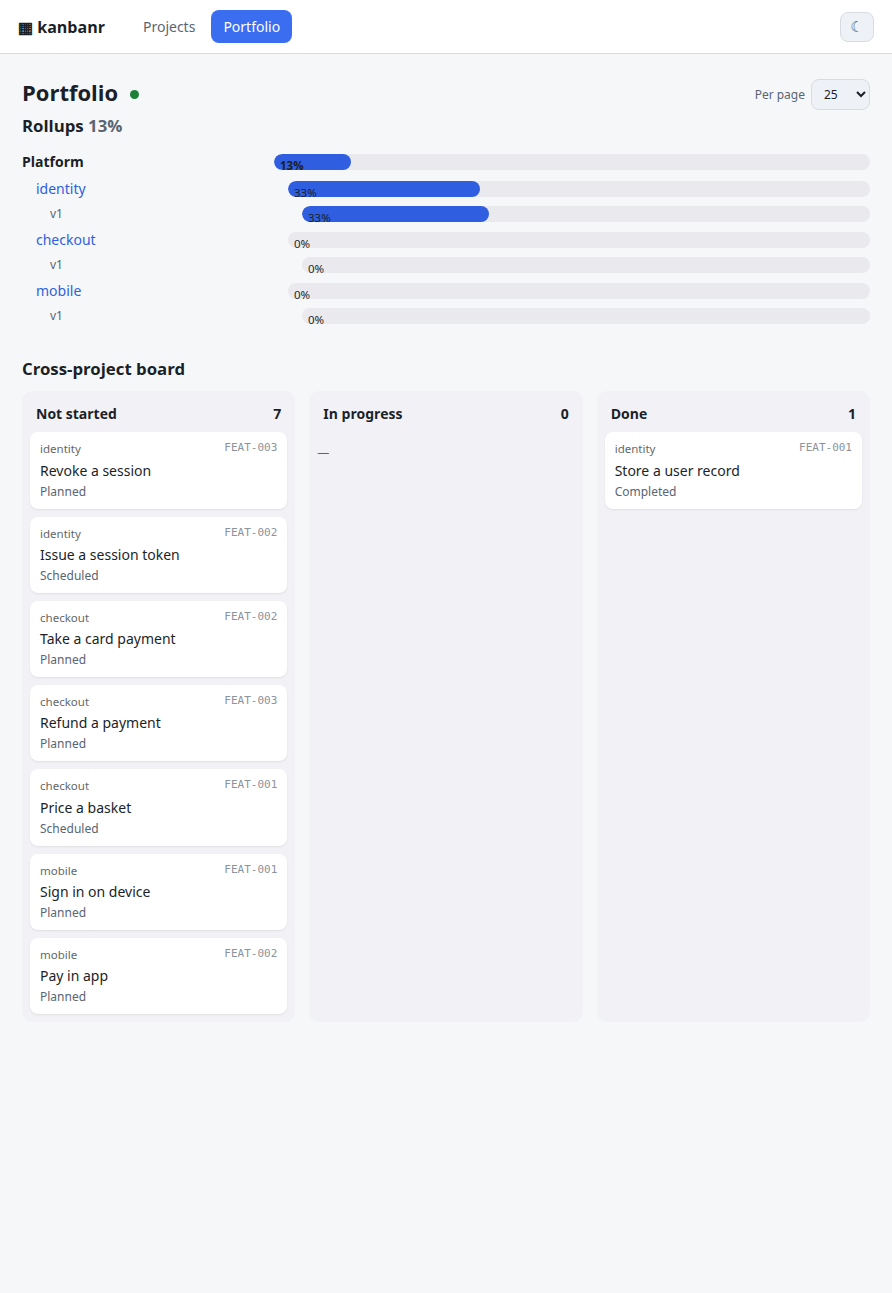
The cross-project board puts every project’s work into one set of normalised lanes, with the
project named on each card. Lanes are normalised because projects need not share a workflow: one
may have Scheduled, another In Progress, and the portfolio maps both onto the same three
columns rather than inventing a common vocabulary the projects never agreed to.
Declaring a program
Projects in a data folder are neighbours; a program is the statement that they belong together.
kanbanr portfolio add-program platform --name "Platform" \
    --projects identity,checkout,mobile
That writes workspace.yaml beside the projects. Without it the portfolio still lists every
project, but nothing groups them and the rollup has only one level.
The limit worth knowing
Everything here works within one data folder, which is also the sharing and access boundary
(ADR-0007). A portfolio spanning boards that different people can see is a different problem —
it needs per-project access with a view across them, which git remotes alone do not give. That is
recorded as FEAT-074, deliberately deferred, with the triggers to revisit it written down rather
than left as an assumption.
Housekeeping and troubleshooting
Housekeeping on the board repository
The board is a git repository and every write is a commit, so an active project accumulates objects. Nothing breaks if you ignore this — git is designed for it — but two things are worth knowing.
cd "$(kanbanr where)"
git count-objects -vH      # loose objects and pack size
git gc                     # pack them; safe, and never touches your data
A board with a few hundred commits and no pack can hold a few thousand loose objects. git gc
collapses that. It compacts storage and changes nothing about content — and it is not a way to
reclaim anything: the logs keep every entry deliberately (one file per day under activity/ and
events/), because raw data is never discarded. What is bounded is what a report shows you.
If you have a remote configured, an occasional kanbanr sync keeps the board pushed; kanbanr where --json tells you which folder is in use and why.
Troubleshooting
monitor not reachablefromkanbanr open— start the view daemon first:kanbanr serve. The monitor is built into the binary, so there is no--ui-dirto find.no commit identity for this board— kanbanr commits only as a real person. Set yours:kanbanr identity --name "You" --email you@example.com(or git’s ownuser.nameanduser.email). Boards made by older versions carry the placeholderkanbanr <kanbanr@local>in their git config;kanbanr doctorpoints it out, and the same command replaces it. Commits already made under the placeholder keep it unless you rewrite the board’s history.could not determine project— pass--project, set$KANBANR_PROJECT, orkanbanr project use <name>(writes a.kanbanrmarker).project '…' not found/ an empty board — you may be pointed at the wrong data folder.kanbanr where --jsonshows which folder is in use and why (--data-dir,$KANBANR_DATA_DIR, the marker, or the./datafallback).- Push/pull conflicts — the data folder is a normal git repo; resolve in it with
gitas usual, then continue. kanbanr: command not found— runmake installand ensure~/.cargo/binis on PATH.- A move was rejected — the transition isn’t allowed; check
kanbanr config show. - A feature add was rejected — every feature needs an existing
--milestone.
See DESIGN.md for architecture and on-disk layout.
Command reference
Complete command reference
Everything the CLI does, grouped by what you are trying to find out. --json works on every read.
Setting up and looking around
| Command | What it does |
|---|---|
kanbanr init <name> | data folder + git repo + identity + project, in one step |
kanbanr project init/edit/list/use/delete | create, rename, select (writes the .kanbanr marker) |
kanbanr where [--json] | which board folder this directory uses, and why |
kanbanr whoami / kanbanr identity | the commit identity this data folder writes as |
kanbanr config show / set-transition / displayed-states / default-state / no-op-states / workflow | the workflow |
kanbanr hooks install / status / uninstall | the Claude Code hooks (session start, stop nudge, test capture, commit guard) |
kanbanr serve [--ui-dir …] | the read-only monitor over this board |
The work
| Command | What it does |
|---|---|
kanbanr board / kanbanr feature list / show / add / edit | the kanban and its items |
kanbanr move <CODE> <STATUS> [--unapproved "…"] | a status change, validated against the workflow |
kanbanr milestone add / list / edit / delete | milestones (a dependency DAG; cycles rejected) |
kanbanr todo add / list, kanbanr task add / state / list | persistent todo-lists on an item |
kanbanr export <CODE> --format md|json | one item, rendered for a human or a machine |
kanbanr query "text" [--goal G-1] [--gap …] [--all-projects] | rich filters plus full text, across projects |
kanbanr activity / kanbanr events | the changelog, and the notification event log |
kanbanr doc folder / add / tree / list / show / rm | the documentation tree |
Dependencies and scheduling
| Command | What it does |
|---|---|
kanbanr ready / kanbanr blocked | what can be started now, and what is waiting on something |
kanbanr impact <CODE> | everything downstream of an item — what breaks if it slips |
kanbanr graph [--format dot|json] | the dependency graph |
kanbanr critical-path / kanbanr gantt | the longest chain, and a Mermaid schedule |
kanbanr portfolio … | cross-project rollups for a program of several boards |
Keeping it honest
| Command | What it does |
|---|---|
kanbanr doctor | every broken reference and every gap, across the board |
kanbanr check [CODE] | what one item has not said, and what it cannot yet show |
kanbanr review [CODE] [--pending] [--ui] | the decision brief — one item, all of them, or in the browser |
kanbanr approve <CODE> [--by …] | records agreement, attributed to the board’s commit identity |
kanbanr unapprove <CODE> --reason "…" | takes an agreement back; the record of having given it stays |
kanbanr capture | reads a test run’s output (run by the hook; you never call it) |
kanbanr split-from <CODE> <PARENT> | records that an item was sliced out of another |
kanbanr sources [--write] | imported items whose source file has gone |
kanbanr index | rebuild the per-project cache from the source-of-truth files |
Sharing
| Command | What it does |
|---|---|
kanbanr remote add / list / remove, kanbanr sync | git remotes for the board, and an immediate push |
kanbanr mirror enable / disable / status / sync / link / pull | one-way mirror of items to GitHub issues |
kanbanr batch [--dry-run] [--file …] | many changes in one call and one commit |
On-disk layout
On-disk layout
The board is a git repository beside the code repository, not inside it — <repo>.kanbanr as
a sibling (FEAT-041). A board inside a checkout is one git add -A away from being committed; a
sibling cannot be.
<repo>.kanbanr/                         # a git repository (every write is a commit); no accounts/secrets
└── projects/
    └── <project>/
        ├── config.yaml                 # statuses, default_state, transitions, displayed/no-op/terminal states, branch_pattern
        ├── activity/                   # the activity changelog, one file per day (FEAT-066)
        │   └── 2026-09-28.yaml          # {time, actor, message, item}, appended in order
        ├── events/                     # the notification event log, one file per day (FEAT-036, FEAT-066)
        │   └── 2026-09-28.yaml
        ├── charter.yaml                # purpose, goals, non-goals, stakeholders, adopted_at (FEAT-046)
        ├── lessons.yaml                # what was learned, with decaying confidence (FEAT-055)
        ├── mirror.yaml                 # GitHub issue mirror config, when enabled (FEAT-043)
        ├── index.yaml                  # derived cache of item metadata, rebuildable (FEAT-033)
        ├── features/                   # every item, filed under its status (FEAT-071)
        │   └── <Status>/                # e.g. Planned/  In Progress/  Completed/
        │       ├── FEAT-001.yaml         # item METADATA only — including definition, defect, history
        │       └── features-spec/
        │           └── FEAT-001.md       # the specification markdown
        ├── milestones/MS-001.yaml       # code, name, description, depends_on[]
        └── docs/                        # documentation tree (markdown)
            ├── decisions/               # ADRs: front-matter + prose (FEAT-057)
            ├── retros/                  # wave retrospectives (FEAT-054)
            └── design/
                ├── _folder.yaml         # folder name + short description
                └── overview.md
Side files, not new entities. charter.yaml, lessons.yaml and mirror.yaml follow one
pattern: absent means “none”, empty removes the file, and none of them is part of Project — so
GET /projects/{p} is unchanged by their presence and an older board loads without them.
Everything else on an item is inline. definition, defect, split_from and history live
in the item’s own yaml, because they then ride move/rename/index/flush for free and every consumer
(doctor, export, query, report, trace) wants them anyway. Each new field is optional and
skip_serializing_if its empty value, so a board written by an older version re-serializes byte
for byte (ADR-0005). Adding one means touching exactly three places — the FeatureItem struct,
meta() and from_meta() — which the compiler enforces.
Changing a feature’s status moves both its <Status>/<code>.yaml and
<Status>/features-spec/<code>.md into the new status folder, and appends a transition to the
item’s history[] — including when ticking the last task auto-completes it, which is how most
items actually finish. All writes are done by the CLI (the single writer). There is no
security.yaml — kanbanr has no accounts (ADR-0001).
HTTP API
HTTP API (the view daemon — read-only, no auth)
The daemon serves only reads (writes happen in the CLI, not over HTTP). There is no auth; it binds localhost by default.
| Method & path | Purpose |
|---|---|
GET /healthz | liveness/readiness probe |
GET /api/projects | project summaries (home tiles) |
GET /api/projects/:p | full project (config, features, milestones) |
GET /api/projects/:p/features/:code/export?format=md|json | Claude-ready export |
GET /api/projects/:p/docs · …/docs/content?path= | docs tree / a doc’s markdown |
GET /api/projects/:p/activity | recent activity (the changelog) |
GET /api/projects/:p/events · GET /api/events | SSE change streams |
Writes happen in the CLI (dispatch)
All mutations go through kanbanr-core::dispatch from the CLI (and the same (method, path, body) shapes the daemon would read): create/edit projects, features (never deletable), tasks,
todo-lists, milestones, config, docs — plus POST /projects/:p/batch for a bundle in one commit.
Each write appends to the activity log and commits the data repo. The batch body is
{ "operations": [ { "op": "...", ... } ] } with op types feature.add, feature.edit,
feature.move, milestone.add, todo.add, task.add, task.state, doc.folder, doc.write;
created items may carry a ref alias later ops reference; the first failure names its index.
Architecture overview
Goals & principles
- YAML/markdown files only — no database; human-readable and version-controllable.
- The CLI is the single writer — it edits the local data folder directly (store +
dispatch+ git). There is no server in the write path, no login, no accounts. - The view is a read-only, localhost monitor —
kanbanr serveserves the read API + live SSE + the SPA over the same folder. No auth (expose beyond localhost only behind a reverse proxy). The viewer is pluggable (today a React SPA; a VS Code extension is on the roadmap). - Git is the sharing/centralization boundary — the data folder is a git repo; every write is a
commit by the configured identity (
kanbanr identity); optional remotes are pulled + pushed after each commit. Merge conflicts are left for normal git resolution — kanbanr never auto-resolves. - One runtime, no Docker required — a single
kanbanrbinary is both the writer and (viakanbanr serve) the view daemon. Docker is just one optional packaging. - On-disk layout mirrors the board — feature items live in a folder named after their status.
- Multi-project — one data dir with a folder per project.
Components
flowchart LR
  subgraph dev["Developer in VS Code"]
    Claude["Claude + kanbanr skill"]
  end
  CLI["kanbanr (CLI)<br/>local writer + 'serve'"]
  Core["kanbanr-core<br/>store · dispatch · git · activity · export"]
  FS[("data/ — a git repo<br/>YAML + markdown")]
  Daemon["kanbanr serve<br/>view daemon (read API + SSE + SPA)"]
  Browser["React monitor (view-only)<br/>· future: VS Code ext / TUI"]

  Claude -->|"runs commands"| CLI
  CLI --> Core
  Core <-->|"read/write (the writer)"| FS
  CLI -->|"commit + pull/push"| Remote[("git remote<br/>(sharing)")]
  Daemon --> Core
  FS -. "file change events" .-> Daemon
  Daemon -->|"JSON + SSE /api/*"| Browser
  Daemon -->|"serves built SPA"| Browser
kanbanr-core is the engine (models, store, validation, git, the activity changelog, and a
dispatch router that maps (method, path, body) onto store calls — the single source of truth
for data operations). The CLI links it to write the folder directly; the view daemon
(kanbanr-server, a library run by kanbanr serve) links it to read. Both go through dispatch,
so they agree by construction. It’s all one binary.
Runtime: one writer, a read-only view, git
sequenceDiagram
  participant C as Claude (skill)
  participant K as kanbanr (CLI, writer)
  participant R as board repo (sibling)
  participant D as kanbanr serve (view)
  participant B as Browser (monitor)

  B->>D: GET /api/projects/:p   (no auth)
  B->>D: open SSE /api/projects/:p/events
  C->>K: edit (add feature / move / task …)
  K->>R: dispatch → write YAML/md, append today's activity file, git commit
  K->>R: pull + push remotes — best-effort, conflicts left for normal git
  R-->>D: file change event (notify)
  D-->>B: SSE changed event → refetch live
- No accounts, no JWT. The writer is you on your machine; the view is a localhost read-only window onto your files. Access control for sharing is the git remote’s job (e.g. GitHub decides who can pull/push the data repo).
- Identity for commits comes from the data repo’s git config (
kanbanr identity --name --email), else the user’s own git identity, the same in every write — the first commit included. With neither, kanbanr refuses the write rather than commit as a placeholder. - Git uses
git2/libgit2, statically linked — no externalgitbinary. Sync is best-effort and never blocks a write; a conflict aborts the merge cleanly and is resolved with normal git in the folder. - Exposure.
kanbanr servebinds127.0.0.1by default and has no TLS/auth by design. To reach it from another machine, leave the bind alone and put it behind a reverse proxy that terminates TLS and adds auth (Caddy/nginx examples in USER_GUIDE.md).
The data model
Data model
erDiagram
  PROJECT ||--o{ MILESTONE : has
  PROJECT ||--o{ FEATURE : has
  PROJECT ||--o{ DOC_FOLDER : has
  MILESTONE ||--o{ MILESTONE : "depends_on (DAG)"
  MILESTONE ||--o{ FEATURE : "groups (required)"
  FEATURE ||--o{ TODO_LIST : "todo-lists (epic)"
  TODO_LIST ||--o{ TASK : tasks
  DOC_FOLDER ||--o{ DOC_FOLDER : "nested"
  DOC_FOLDER ||--o{ DOC_FILE : contains

  PROJECT {
    string name
    string description
    list statuses
    string default_state
    map transitions
    list displayed_states
    list no_op_states
  }
  FEATURE {
    string code
    string title
    string status
    string milestone
    string specification
  }
  TODO_LIST {
    string code
    string description
    string created_at
  }
  TASK {
    string key
    string text
    enum state
  }
  MILESTONE {
    string code
    string name
    list depends_on
  }
  DOC_FOLDER {
    string path
    string name
    string description
  }
  DOC_FILE {
    string path
    string title
  }
- Status is a configurable label; transitions is a map
from → [allowed to];displayed_statesis the ordered subset the dashboard shows;default_stateis the status a new feature starts in.no_op_statesflags statuses that are inert dispositions (e.g. “No Action”, “Not Applicable”, “Out-of-Scope”): always non-displayed (kept disjoint fromdisplayed_states), and a feature in a no-op state does not auto-advance to Completed. - Permanence / referential integrity: feature items are never deletable (the work is permanent). A milestone can be deleted only when unreferenced; a status removed only when no feature is in it; a project deleted only when it has no features and no milestones — so any project with work is locked from deletion.
- A feature’s milestone is required. A feature acts as an epic: it holds many persistent
todo-lists (one added per work session), each with its own tasks (keys unique per list).
TASK.stateisNotStarted | InProgress | Completed; when every task across ALL the feature’s todo-lists is Completed, the feature auto-advances to a “Completed” status when allowed. Todo-lists are displayed newest-first; the status page shows only the not-fully-completed ones. - There is no Schedule entity. A “schedule” is derived: for a status, the milestones holding features in that status (dependency-ordered).
Activity changelog
Each write appends an entry to projects/<id>/activity/<YYYY-MM-DD>.yaml — {time, actor, message, item}, where actor is the commit identity and message a short description of the change. Events
(FEAT-036) are stored the same way under events/.
Nothing is ever trimmed (FEAT-066). An earlier version kept one capped file, which meant the log quietly discarded its own oldest entries — and a retrospective reading a wave that had aged out reported “no recorded moves”, which reads as nothing happened rather than the evidence was deleted. One file per day instead: a read walks the days newest-first and stops once it has enough, so bounding the read costs nothing while the raw record stays complete. Summaries are derived from it; it is never derived from them.
The view daemon serves it at GET /api/projects/:p/activity, and the monitor renders a “Recent
activity” panel. It is plain data in the folder (no git plumbing needed to read it) and works the
same with or without a remote. (The full audit trail still lives in git history.)
Reasoning, evidence and traceability
Reasoning, evidence and traceability (MS-006)
The board above records what is being built. This layer records why it exists, what must be true, and what proves it — and, deliberately, records nothing it cannot derive.
The graph
charter.purpose
  └── G-2  goal
       └── FEAT-046  item              definition.goals: [G-2]
            ├── R-2  requirement        (EARS text, ISO tag, measured scenario)
            │    └── test               (planned → red → green, stamped with checked_rev)
            ├── FEAT-058  defect        violates: FEAT-046/R-2   introduced_by: FEAT-046
            ├── design/mirror.md        refs: [FEAT-046, R-2, G-2]
            ├── ADR-0003                affects: [FEAT-046]  driven_by: [FEAT-046/R-2]
            └── code / commits          // … (FEAT-046 R-2)  ·  Refs: kanbanr:FEAT-046/R-2
Three rules keep it from rotting:
- The manifest is canonical — board yaml, document front-matter, and the commit trailer. An id that does not resolve is an error, like a dangling dependency.
- Inline annotations are a derived convenience —
(FEAT-046 R-2)on the module or function that owns the behaviour. They survive the refactors that destroygit blame; they are never the only record. - Views are derived, never stored (ADR-0002).
kanbanr trace --jsongenerates the traceability manifest for CI or an audit; nothing writes it back. A stored manifest would be a third copy of links that already exist, and the copy that goes stale first.
Modules
| Module | What it owns |
|---|---|
charter | the project’s purpose and goals — a side file, absent by default |
ears | the five EARS patterns and the nine ISO/IEC 25010 characteristics; classifies, never rejects |
doctor | every structural check, all warnings except broken references; scoped so it stays readable |
report | flow and quality derived from history, defects and test states |
retro | a wave’s account, with changelog-derived spans reported apart from measured ones |
lessons | what was learned, with confidence that decays unless reaffirmed |
scm | the trailer grammar, branch naming and reference validation |
adr | decisions as documents with front-matter; supersede is the one two-sided link |
trace | the downward chain and its gaps, and the derived Zachman view |
query, graph, gantt, portfolio, mirror, eventing | search, dependencies, scheduling, rollups, the GitHub mirror, notifications |
validate, hash, error, docs | id generation, stable hashing, error taxonomy, the doc tree |
Two deliberate asymmetries
Approval is pinned to content, not to time. definition.approval.rev is a stable hash of the
definition with the approval itself and the test states excluded — recording evidence must not
lapse an approval, but changing scope must. Editing the definition after a yes therefore reports
“approval lapsed”, which is a different thing from “never approved”.
The gates refuse two things and warn about everything else. A reference that names something the board does not have, and a commit that names nothing, are refused — both fixable in the message the author is already writing. Everything else warns, because a check that blocks legitimate work gets bypassed wholesale (ADR-0004), and a check that fires on everything gets ignored.
Workflow contract (how Claude uses it)
kanbanr is designed to be the single system of record for a project’s activity — the only
project information that stays outside it is the raw conversation transcript. The skill
(skill/kanbanr/SKILL.md) encodes the behavioral contract: adopt kanbanr for the whole project
on one trigger phrase (“start using kanbanr for this project”); never track work in an
ephemeral/in-session list (use persistent todo-lists on feature items); recover/resume state from
kanbanr at the start of each session; keep it updated before and after every task; review a
feature’s spec for staleness when moving it out of Deferred; never delete feature items (move
them, e.g. to a no-op state); model every kind of work as a work item (feature/chore/recurring,
ongoing items in a non-displayed status); and prefer one batch call to bundle changes. The
durable, file-backed data model makes the project resumable across sessions by design.
The monitor’s navigation map
Web navigation map
flowchart TD
  Home["/  Home — project tiles (dashboard + status + docs links)"]
  Board["/p/:project  Board (columns = displayed states)"]
  Status["/p/:project/state/:state  Status page (grouped by feature → tasks)"]
  Feature["/p/:project/feature/:code  Feature page (Specification + Tasks + export)"]
  Ms["/p/:project/milestones  Milestones list"]
  MsOne["/p/:project/milestone/:code  Milestone (depends-on + feature tiles)"]
  Sched["/p/:project/schedule  Schedule (derived: milestones per status)"]
  Docs["/p/:project/docs  Documentation tree"]

  Home --> Board --> Status --> Feature
  Board --> Feature
  Board --> Ms --> MsOne --> Feature
  Board --> Sched --> MsOne
  Home --> Docs
Testing
Testing
Testing is two-layered:
- Unit tests (
kanbanr-core): thedispatchrouter, transition validation, code generation, milestone DAG cycle detection, all-tasks-done auto-complete (across todo-lists), status-folder file moves, milestone-required. - Layer 1 — functional integration (
api/crates/kanbanr-cli/tests/): the real coverage, no Docker.local_mode.rsdrives the realkanbanrCLI writing an ephemeral data dir under the build output (CARGO_TARGET_TMPDIR) — create/move/todo/task, auto-complete, init, identity, and that the data dir is a git repo committed under the configured identity.view_daemon.rsthen runskanbanr serveover that folder and asserts the read API + the activity endpoint serve it with no auth. - Layer 2 — packaging smoke (
api/crates/kanbanr-cli/tests/integration.rs): uses testcontainers to confirm the real Docker image boots, scaffolds a project, and serves the read-only view (no auth). It does not re-test business logic (that’s layer 1).#[ignore]d (needs Docker + image); run withmake itest.
Contributing to kanbanr
Thanks for your interest! kanbanr is a personal open-source project — maintained best-effort, friendly to contributors, no SLA. Small fixes and focused features are very welcome; please open an issue before large changes so we can agree on the approach.
What kanbanr is (so contributions fit the design)
One binary. kanbanr is the only writer — the CLI edits a git-backed data/ folder directly
(driven by a Claude skill). kanbanr serve runs a read-only view daemon (localhost, no auth, no
accounts) over the same folder. Sharing is delegated to git remotes. Keep this split intact:
- All writes go through
kanbanr-core(the engine: store ·dispatchrouter · git · activity). The CLI and the daemon both call core; don’t add a second write path. - The web UI and the
servedaemon never mutate data. They read and stream. New “actions” in the UI should be read-only (e.g. export). - Data is human-readable YAML/markdown; no database.
See Architecture overview for the full architecture.
Prerequisites
- Rust stable (
rustup), withrustfmtandclippy. - Node 22+ and npm (for the web SPA).
- A C toolchain for the vendored libgit2 + OpenSSL build:
cmake,make,perl, and a C compiler (gcc/clang). On Debian/Ubuntu:sudo apt-get install -y cmake make perl gcc. On macOS:brew install cmake(perl ships with macOS). On Windows: cmake + Strawberry Perl onPATH.The first build compiles vendored C from source and is slow (a few minutes); it’s cached afterward. This is expected, not a hang.
Build, test, lint
From the repo root (the Makefile wraps the common flows):
make build          # cargo build --release (api/) + web build
make test           # cargo test --workspace (unit + Docker-less integration)
make itest          # packaging smoke: build the image + testcontainers test (needs Docker)
Run the same checks CI runs before opening a PR — all of them, in one command:
make ci
It copies the tracked tree to a clean folder (~/.cache/kanbanr-ci/tree, with its own build
cache) and runs every CI check that can run off GitHub, reading each step’s script from the
workflow file itself, plus actionlint and a check that every action the workflows use exists. It
ends by listing what only GitHub can verify: the macOS and Windows legs, uploads and publishing.
It needs Docker (for actionlint and PowerShell), an authenticated gh, shellcheck, and the
mdbook / mdbook-mermaid versions pinned in docs.yml, and cargo-deny + cargo-audit
(cargo install cargo-deny cargo-audit --locked). The individual checks, if you want one:
cd api && cargo fmt --all --check          # formatting
cd api && cargo clippy --workspace -- -D warnings   # lints (warnings are errors)
cd api && cargo test --workspace
cd web && npm ci && npm run build          # web type-check + build
Run the app locally to try your change:
make serve # builds the SPA + serves the read-only monitor on http://localhost:8080
Coding conventions
- Rust:
cargo fmt+clippyclean (no warnings). Match the surrounding style; comments explain why, not what, at the density of the file you’re editing. - TypeScript/React: the UI is read-only and plain (
fetch+EventSource); no state libraries. Keep components small and typed. - Prefer a single
kanbanr batch/dispatchroute over bespoke one-off code paths. - Update tests for behavior changes;
kanbanr-coreis where the engine tests live. - Update the relevant docs (the Using kanbanr and Architecture chapters, the skill) when you change a contract.
The bar: say why, and show it works
kanbanr asks the same thing of a contribution that it asks of its own maintainer, because this project’s board is the demonstration that the method works — a change that skipped it would break the demonstration. The bar is one sentence long:
State why the change exists, and prove each requirement with a test that actually passed.
In practice, the PR template has a Definition block. Fill it in:
- A statement — what the change gives whom, and why. One sentence.
- The six dimensions — what / how / where / when / who / why, a line each.
- Requirements in EARS form (
WHEN … THE SYSTEM SHALL …), each with the test that proves it, named exactly as your test runner prints it. - Leave what you don’t know blank. A blank is reported and can be filled; an invented answer reads like rigour and is worse than nothing. If something is genuinely ambiguous, ask in the issue rather than guessing.
You do not need the board to do this. kanbanr check --file definition.yaml validates a
definition on its own, which is what CI runs on your PR — no board access required.
A worked example
A real change from this project’s own history, end to end. The defect: ticking an item’s last task auto-completed it without recording the status change, so cycle time was blind to the normal way items finish.
statement: "A recorded transition for every status change, however it happened, so that flow numbers
  describe the items that finished normally rather than only the ones moved by hand"
goals: [G-2]
zachman:
  what: "The history entry an auto-completion did not write"
  how: "The auto-complete branch appends the same Transition a manual move does"
  where: "kanbanr-core/src/store.rs, set_task_state_on"
  when: "Whenever the last open task of an item is completed"
  who: "Anyone reading cycle time, which was blind to the normal path"
  why: "Auto-completion is how most items reach a terminal status, so the measurement was missing
    precisely where it mattered"
requirements:
  - kind: functional
    text: "WHEN completing a task auto-completes its item, THE SYSTEM SHALL append the same
      transition a manual move records."
    tests:
      - name: tests::auto_completion_records_the_move_like_any_other
        kind: unit
        state: green
  - kind: functional
    text: "WHEN a status is renamed, THE SYSTEM SHALL leave the items' histories unchanged."
    tests:
      - name: tests::auto_completion_records_the_move_like_any_other
        kind: unit
        state: green
The commit that followed carried Refs: kanbanr:FEAT-061/R-1 in its trailer, and the test named
above is the one that ran. That is the whole shape: a reason, a requirement, a test, a reference.
A note on this project’s own board. Items created before the method was adopted have no definition, and
kanbanr doctordeliberately does not report them. The board reads as adopted, not abandoned — everything from that point on meets the bar above.
Commits & pull requests
- Fork, branch off
main(feature/short-nameorfix/short-name). - Keep commits focused; write clear messages (imperative mood: “Add …”, “Fix …”).
- Reference what the change serves in the commit trailer:
Refs: kanbanr:FEAT-046/R-2if you know the item, or describe it in the PR if you don’t have the board. - Optionally sign off your commits (
git commit -s) to certify the Developer Certificate of Origin. - Make sure
make ciis green, and that every requirement in your definition has a green test. - Open a PR; fill in the template, definition included; link any issue.
Licensing of contributions
kanbanr is dual-licensed MIT OR Apache-2.0 (see LICENSE-MIT and LICENSE-APACHE). Unless you state otherwise, any contribution you intentionally submit for inclusion is licensed under those same terms, per section 5 of the Apache-2.0 license, with no additional terms or conditions.
Reporting bugs / requesting features
Use the GitHub issue templates. For anything security-sensitive, do not open a public issue — follow SECURITY.md.
kanbanr — Roadmap
The board is the roadmap. This file used to duplicate it — milestones, the features under each, and a “won’t do” list — and a duplicate of live state is a document that is wrong the moment something moves. Everything it held now lives where it is maintained:
| What you want | Where it is |
|---|---|
| What is planned, in progress and done | kanbanr board — or the monitor, kanbanr serve |
| The milestones and their order | kanbanr milestone list (a dependency DAG) · kanbanr critical-path |
| What can be started right now | kanbanr ready · what is waiting: kanbanr blocked |
| Why the project exists, and what it will not do | kanbanr charter show — the non-goals section |
| Why an item exists and how it will be verified | kanbanr feature show <CODE> · kanbanr trace <CODE> |
| Why the architecture is the way it is | kanbanr adr list |
| How the last wave actually went | kanbanr retro <MS-00x> |
A released version’s scope is in CHANGELOG.md, which is the roadmap’s durable half: it says what shipped rather than what was hoped for.
If you are reading this in a published repository without the board beside it, the CHANGELOG is the honest summary. The board is a separate git repository (
<repo>.kanbanr) because it is the project’s working memory, not part of the shipped artifact.
kanbanr — Open-Sourcing & Release Guide
A concrete, checklist-style path to publishing kanbanr publicly and keeping it maintainable — sized for a personal open-source project (one maintainer, friendly to contributors), not a foundation-governed one. Pair with ROADMAP.md and the board’s own assessment (
kanbanr doc show notes/assessment.md).Status today (updated): the workspace is now relicensed MIT OR Apache-2.0 with
LICENSE-MIT+LICENSE-APACHEfiles;CONTRIBUTING.md,SECURITY.md,CODE_OF_CONDUCT.md,CHANGELOG.md,THIRD_PARTY.md, GitHub issue/PR templates, a CI workflow and a release workflow all exist. What’s left is mostly your work: reserve names, create accounts/tokens, fill two placeholders, add screenshots, and cut the first tagged release. Checked boxes below mark what’s already in the repo.Placeholders: filled. The GitHub owner is
startr-trade(README, this file, templates, workflows, manifests), and the contact address inCODE_OF_CONDUCT.mdandSECURITY.mdiskanbanr-oss-support@startr.trade. The copyright line inLICENSE-MIT/LICENSE-APACHEand theauthorsfield inapi/Cargo.tomldeliberately read the kanbanr authors — change it only if you want a personal name on the licence.# Forking this under a different owner? One pass replaces every reference: grep -rl 'startr-trade' . --exclude-dir=.git --exclude-dir=node_modules --exclude-dir=target \ | xargs sed -i 's/startr-trade/YOUR_GITHUB_OWNER/g'
Accounts, keys & credentials you’ll need (start here if this is your first OSS project)
Open-sourcing kanbanr means publishing to a few different services. Each needs an account and usually a token — a long secret string that proves you’re allowed to publish. You create the token once on the service’s website, then either paste it into your terminal (for a one-off manual publish) or store it as a GitHub Actions secret (so the automated release workflow can publish for you). Never paste a token into a file that gets committed.
The golden rules (these are the “measures” to take):
- Turn on 2FA (two-factor auth) on every account below. crates.io and npm now require it to publish.
- Use a password manager for accounts + tokens.
- Scope tokens narrowly and give them an expiry. A publish token should only be able to publish.
- Prefer “Trusted Publishing” where offered (crates.io and npm support it): instead of a long-lived token, GitHub Actions proves its identity to the registry over OIDC at publish time, so there’s no secret to leak. You set it up on the registry’s website by naming your GitHub repo + workflow. This is the modern best practice — use it if you can; the token method below is the fallback.
- Store automation tokens only in GitHub → your repo → Settings → Secrets and variables →
Actions → New repository secret. Workflows read them as
${{ secrets.NAME }}; they’re masked in logs and never shared with pull requests from forks. - Rotate (regenerate) a token immediately if it ever leaks, and treat anything that touched a commit as already leaked.
What each destination needs
| Destination | What it’s for | Account | Credential to create | Where it lives |
|---|---|---|---|---|
| GitHub | Hosts the repo, runs CI, stores release binaries, serves the plugin marketplace | github.com (free) + 2FA | an SSH key for git push; CI’s GITHUB_TOKEN is automatic | SSH key on your laptop (~/.ssh); GITHUB_TOKEN is injected into Actions — nothing to store |
| crates.io | Publishes the standalone ears-classifier library — the only crate that is published. kanbanr itself is not on crates.io (see §5) | crates.io (log in with GitHub) + 2FA | an API token, or set up Trusted Publishing | CARGO_REGISTRY_TOKEN secret, or none (Trusted Publishing) |
| GHCR (GitHub Container Registry) | Publishes the Docker image so docker run ghcr.io/startr-trade/kanbanr works | your GitHub account | none — Actions uses the automatic GITHUB_TOKEN (packages: write) | nothing to store; locally use a PAT with write:packages |
| Claude Code plugin marketplace | Lets users claude plugin install kanbanr | your GitHub account | none — it’s just your public git repo | nothing — users add the repo URL |
VS Code Marketplace (only when you ship the extension — editor/vscode/) | Publishes the VS Code extension | Azure DevOps account (free) + a publisher at marketplace.visualstudio.com/manage | a Personal Access Token scoped Marketplace → Manage | VSCE_PAT secret |
| Open VSX (optional, open-source VS Code registry) | Same extension for VSCodium/Cursor/etc. | open-vsx.org (log in with GitHub) | an access token | OVSX_TOKEN secret |
| npm (probably NOT needed) | Only if you ever publish the web UI as a reusable package — kanbanr bundles it into the binary, so you likely just reserve the name | npmjs.com + 2FA | an Automation token | NPM_TOKEN secret |
You don’t need every row. For a first release the essentials are GitHub (always: it hosts the release archives and the installers) and GHCR (for
docker run). crates.io is only forears-classifier. The Claude plugin needs nothing beyond a public repo. VS Code / Open VSX / npm can come later.
Step-by-step: creating each credential
GitHub SSH key (to push code) — on your laptop:
ssh-keygen -t ed25519 -C "you@example.com"   # press Enter for defaults; set a passphrase
cat ~/.ssh/id_ed25519.pub                     # copy this line
Paste it at GitHub → Settings → SSH and GPG keys → New SSH key. Test: ssh -T git@github.com.
crates.io API token (to publish ears-classifier):
- Sign in at crates.io with GitHub; enable 2FA.
- Account Settings → API Tokens → New Token. Name it
kanbanr-release; scope to publish-update (plus publish-new for the very first publish); set an expiry. - Manual publish:
cargo loginthen paste it (stored in~/.cargo/credentials.toml— never commit). - Automated publish: add it as the
CARGO_REGISTRY_TOKENsecret and set repo variablePUBLISH_CRATES=true(the release workflow’s crates job is guarded on that). Better: skip the token and set up Trusted Publishing on crates.io (your crate → Settings → Trusted Publishing → addstartr-trade/kanbanr+ therelease.ymlworkflow), then delete the token line. The job publishesears-classifieronly; every kanbanr crate declarespublish = false, so a straycargo publishof one of them is refused. - ⚠️ A published version is permanent — you can
cargo yanka bad version but never delete or reuse it. Double-check beforecargo publish.
GHCR (Docker image): nothing to create — the release workflow logs in with the built-in
GITHUB_TOKEN. To push from your laptop instead, make a GitHub Personal Access Token (Settings →
Developer settings → PATs) with write:packages, then
echo $PAT | docker login ghcr.io -u startr-trade --password-stdin.
VS Code Marketplace PAT (when you publish the extension):
- Create a free Azure DevOps account at dev.azure.com (Microsoft runs the VS Code Marketplace on it — counter-intuitive but required).
- Create a publisher at https://marketplace.visualstudio.com/manage.
- Azure DevOps → User settings → Personal Access Tokens → New: Organization All accessible organizations, Scopes Custom defined → Marketplace → Manage, set an expiry.
- Publish:
npx vsce publish -p <PAT>, or store it as theVSCE_PATsecret and let CI run it. Optional Open VSX: account at open-vsx.org → token →npx ovsx publish -p <OVSX_TOKEN>.
Where the automation secrets go: GitHub repo → Settings → Secrets and variables → Actions →
New repository secret: CARGO_REGISTRY_TOKEN, VSCE_PAT, etc. (and the PUBLISH_CRATES variable
under the same page’s “Variables” tab). The workflows reference them as ${{ secrets.NAME }} /
${{ vars.NAME }}; they never appear in logs.
0. Before you make the repo public — a safety sweep
Do this first; making a repo public (and pushing its history) is hard to undo.
kanbanr has no accounts, passwords, or tokens of its own (single-writer CLI + read-only viewer — see DESIGN.md), so there are no app secrets to leak. The real risks are your own content and your publish credentials:
- Nothing of the board ships with the source. kanbanr’s own board lives in a sibling
repository beside this one (
../<name>.kanbanr), which is the layout the tool recommends to everyone (FEAT-041): a board inside a checkout is onegit add -Aaway from being committed, and a sibling cannot be. Publishing it, if you ever want to, is a separategit remote addon that repository — not a decision about this one. - The legacy
security.yamlis gone — an inert leftover from the removed auth model (ADR-0001). It was never tracked (git ls-files | grep security.yamlprints nothing in both repositories) and the file itself has been deleted. - Check git remotes for embedded credentials. A remote like
https://user:token@host/repo.gitleaks the token — use SSH remotes; rungit remote -vto confirm. - Grep the tree and history for anything sensitive:
git grep -niE "secret|token|password|api[_-]?key|@.*\.(com|net)" $(git rev-list --all). - If anything sensitive was ever committed, rewrite history
(
git filter-repo --invert-paths --path <file>) or, simplest, start a fresh repo from a clean checkout with no prior history — then rotate the leaked credential (treat anything that touched a commit as burned).
1. Licensing & legal
- Dual-licensed MIT OR Apache-2.0 — done:
LICENSE-MIT+LICENSE-APACHEadded andlicense = "MIT OR Apache-2.0"set inapi/Cargo.toml(workspace). (Replace the copyright holderthe kanbanr authorswith your legal name/handle if you prefer; if you’d rather stay MIT-only, deleteLICENSE-APACHEand setlicense = "MIT".) - (Optional) Add
# SPDX-License-Identifier: MIT OR Apache-2.0headers where convenient. - Name check:
ears-classifieris confirmed free on crates.io — the only crate name kanbanr needs, since kanbanr itself is not published there. Its first publish claims it. (Check npm too if you’ll reserve it, plus a domain if you want one.) - Third-party notices documented in
THIRD_PARTY.md(vendored libgit2 GPL-2.0-WITH-linking-exception + OpenSSL Apache-2.0, statically linked — fine for MIT/Apache distribution). Still to do: runcargo deny check licenses(and add it to CI) to verify nothing incompatible slipped in.
2. Repo presentation (the “front page”)
- README polish: one-line pitch, a screenshot or short GIF of the live monitor, the 60-second quickstart, the architecture diagram (reuse DESIGN.md), and a clear “is this for me?” (personal, git-backed, Claude-driven).
- Badges: CI status, license, latest release.
- A
docs/index linking USER_GUIDE, DESIGN, ROADMAP, this file. - Capture screenshots in
docs/src/images/(make screenshots) (board, feature page, status page, milestones, docs). A reproducible Selenium-Grid-in-Docker screenshot tool lives in../tools/screenshots/—make screenshotsregenerates them all against a locally-runningkanbanr serve. (No more “login” screen to capture — the monitor has no auth.)
3. Contributor & community files
-
CONTRIBUTING.md— build/test/lint commands, the design constraints (CLI is the only writer), code style, PR flow, inbound=outbound licensing. -
CODE_OF_CONDUCT.md— Contributor Covenant 2.1. (Fill in the contact method placeholder it ships with.) -
SECURITY.md— private reporting (GitHub advisory / email) and the actual security model: no accounts/auth, theservedaemon is read-only on 127.0.0.1, and exposing it is the operator’s job (reverse proxy + TLS). Reports go to a GitHub private security advisory or kanbanr-oss-support@startr.trade. - Issue + PR templates under
../.github/(ISSUE_TEMPLATE/bug_report.yml,feature_request.yml,config.yml,PULL_REQUEST_TEMPLATE.md). - Support promise stated as “personal project, best-effort, no SLA” (in CONTRIBUTING/SECURITY).
-
CODEOWNERSasks thestartr-trade/kanbanr-maintainersteam to review every pull request. Give that team the Maintain role on the repository (Settings → Collaborators and teams): GitHub only requests a review from a team with write access or more. Requiring a code-owner review in branch protection is optional — with a single maintainer it would block your own pull requests unless admins may bypass it. - (Optional) Enable GitHub Discussions for Q&A (the issue
config.ymllinks to it).
4. CI (GitHub Actions)
-
ci.ymlon a push tomainand on pull requests (one run per change; a newer run cancels an older one):cargo fmt --check,cargo clippy -- -D warnings,cargo test --workspace, andnpm ci && npm run buildfor the web, with cargo + vendored-libgit2/openssl caching. - Run everything locally first:
make ci. It runs every CI check that can run off GitHub, reading each step from the workflow files, and lists what only GitHub can verify (the macOS and Windows legs, uploads, publishing). Nothing should reach the public repository thatmake cihas not passed. - Security scanning (FEAT-130):
codeql.yml(Rust, TypeScript and the workflows themselves) andtrivy.yml(dependencies, committed secrets, the Dockerfile) onmain, on pull requests and weekly, reporting to the Security tab;release.ymlscans the image before pushing it and stops on a fixable HIGH or CRITICAL finding; ci.yml’ssupply-chainjob fails on a disallowed licence or a known vulnerability (cargo deny,cargo audit,npm audit). Locally:make audit,make scan-deps,make scan-image,make codeql. Code-scanning uploads need a public repository on the free plan, so they are skipped until it is public. - Suppressions are time-boxed. A scanner finding with no reachable fix goes in
.trivyignore.yamlwith its reason and an expiry date; CI refuses an entry without both, and one past its date. - Actions and runners are pinned. Every third-party action is pinned to a commit SHA with
its version in a comment (CI refuses one that is not), and runners name an image
(
ubuntu-24.04,macos-15,windows-2025), not-latest, so neither changes under the project on the provider’s schedule. Both are updated deliberately — there is no Dependabot. - Once public: Settings → Actions → General → “Require approval for fork pull request
workflows” (all outside collaborators), so no workflow runs on an outsider’s pull request
until a maintainer has read it; and consider requiring code-scanning results in the
mainruleset once the first scans are clean. - Cross-platform matrix (ubuntu/macos/windows) for
cargo test— already inci.yml. - Image build + GHCR push on tags — handled by
release.yml(see §5), so a separatedocker.ymlisn’t needed. - (Optional) Add the
#[ignore]d testcontainers smoke (make itest) to CI.
5. Versioning & releases
- SemVer +
CHANGELOG.md(Keep a Changelog format) in place. -
release.ymltriggered onv*tags does it all: builds cross-platformkanbanrbinaries (linux/macos-arm/macos-x86/windows) and attaches them to a GitHub Release, and pushes the Docker image to GHCR (ghcr.io/startr-trade/kanbanr). - kanbanr is not published to crates.io. A published crate cannot carry the built monitor
(ADR-0009), so kanbanr ships only as the release archives, the
install.sh/install.ps1installers and the GHCR image; from source,make installbuilds the web assets first.kanbanr-cli,kanbanr-coreandkanbanr-serverdeclarepublish = false. - Publish
ears-classifierto crates.io. The workflow’scratesjob publishes it — and only it — on a tag once repo variablePUBLISH_CRATES=trueand theCARGO_REGISTRY_TOKENsecret (or Trusted Publishing) are set. See the credentials section above. - Releases come from
mainonly. The release workflow refuses a tag whose commit is not onmain, so merge first, then tag the merged commit. The docs site deploys only frommainas well. Once the repository is public, add a tag ruleset forv*that lets onlykanbanr-maintainerscreate or delete release tags. - Cut the first release:
git tag v0.1.0 && git push origin v0.1.0, then verify the Release assets + the GHCR image appear. Move the[0.1.0]section in the changelog from Unreleased to dated. - Publish the VS Code extension (
../editor/vscode/) to the VS Code Marketplace (vsce publish, needsVSCE_PAT) and optionally Open VSX (ovsx publish) once you’ve smoke-tested it (F5 launch). Keep itsversionin step with releases.
6. Distributing the skill
The skill is the product surface for Claude users — make it trivial to install:
- Document manual install (symlink/copy
skill/kanbanr→~/.claude/skills/kanbanr) — already in the guide; keep it front-and-center. - Provide an install script /
make install-skillthat does the copy and verifies the CLI is onPATH. - Investigate publishing via the Claude plugin/skill marketplace (the lowest-friction path for users) and link it from the README once available.
- If the MCP direction is taken (ADR-0006 on the board), document the MCP server install alongside the skill.
Distribution as a Claude Code plugin (FEAT-023)
The lowest-friction install path: package the skill and the enforcement hooks together as a
Claude Code plugin, so users get both in one step instead of copying the skill and hand-editing
their settings.json. The plugin files live at the repo root:
.claude-plugin/plugin.json— the plugin manifest. It references the existing skill via"skills": ["${CLAUDE_PLUGIN_ROOT}/skill"](Claude Code discoversskill/kanbanr/SKILL.md) and registers the two hooks inline (SessionStart→session-start,Stop→stop-check) with${CLAUDE_PLUGIN_ROOT}-relativecommandpaths — never hardcoded absolute paths, since the plugin is copied into a cache dir on install..claude-plugin/marketplace.json— a one-plugin marketplace catalog (the plugin’ssourceis"./", the repo root). Relative-path sources resolve only when the marketplace is added via git, which is the intended distribution channel.
Users install with:
claude plugin marketplace add <github-owner>/kanbanr   # add this repo as a marketplace
claude plugin install kanbanr@kanbanr                  # install the plugin (skill + hooks)
(or the in-app /plugin marketplace add + /plugin install equivalents). Validate before
publishing with claude plugin validate ..
Cross-platform hooks ship in two flavors: Linux/macOS use the .sh scripts; Windows uses the
.ps1 equivalents (session-start.ps1, stop-check.ps1) via a hook entry with
"shell": "powershell". Both have the same best-effort, never-block semantics. See
../skill/kanbanr/hooks/README.md.
The plugin carries only the integration, not the program. The kanbanr binary still ships
separately (the GitHub Release archives and installers, or GHCR, per §5 — not crates.io) and must be
on PATH; the hooks are best-effort and stay silent if it isn’t installed. Keep the manifest’s
version in step with releases (or omit it to let the git SHA version the plugin).
- Reserve the marketplace/plugin name and confirm it isn’t an Anthropic-reserved name.
- Run
claude plugin validate .in CI; verify install + the two hooks fire on a clean machine. - Link the
claude plugin installone-liner from the README once the repo is public.
7. Pre-announcement checklist
- Fresh clone → follow the README quickstart on a clean machine → you reach a populated board with no undocumented step. (Ideally on macOS/Windows too.)
-
make/cargo test/ web build all green in CI. - LICENSE(s), CONTRIBUTING, SECURITY, CODE_OF_CONDUCT, CHANGELOG, THIRD_PARTY present.
- Owner slug (
startr-trade) + copyright/email placeholders filled (see the top of this file). - Names reserved (GitHub, and
ears-classifieron crates.io); image + binaries published for the first tagged release. - Discussions enabled (optional),
release.ymlsecrets/variables set if publishing. - Secrets sweep (§0) re-confirmed on the exact commit you’ll make public.
- Screenshots (
make screenshots) + a couple of example projects underdata/projects/(non-sensitive).
8. After launch (keep it alive without burning out)
- Triage with labels; be explicit that it’s a personal project (best-effort).
- Keep the board current so contributors know where to help —
kanbanr readyis the answer to “what can I pick up?”. - Dependency updates are deliberate, not automatic: there is no Dependabot version-update
config (it opened one pull request per major bump across four ecosystems). Update on your own
cadence with
cargo update/npm updateandnpm audit, plan major upgrades as board items, and re-runcargo deny. Dependabot alerts and security updates are repository settings, independent of any file, if you want to be told about vulnerabilities. - Cut releases from
CHANGELOG.md; don’t letmaindrift far ahead of a tagged release.
Minimal first-pass (the smallest credible public release)
Most of the scaffolding now exists in the repo. The shortest path to a public v0.1.0 is just the manual steps only you can do:
- Create the
startr-trade/kanbanrrepository on GitHub (the owner slug is already filled in throughout). - Run the secrets sweep (§0); remove
data/security.yaml; decide whatdata/to publish. git init(if needed), commit, push, make the repo public.- Set up crates.io publishing for
ears-classifier(token or Trusted Publishing, plusPUBLISH_CRATES=true); its first publish reserves the name. kanbanr itself is not published there. git tag v0.1.0 && git push origin v0.1.0→ the release workflow builds binaries + the GHCR image.- Add screenshots to the README (
make screenshots), then announce.
Everything else (Open VSX, npm reservation, MCP, badges polish) can follow.
Changelog
All notable changes to kanbanr are documented here. The format follows Keep a Changelog, and the project aims to follow Semantic Versioning.
Unreleased
Added
Security scanning in CI, and one CI run per change (FEAT-130)
- CodeQL (
codeql.yml) analyses the Rust, the TypeScript (monitor and VS Code extension) and the workflows themselves, onmain, on pull requests and weekly. - Trivy (
trivy.yml) scans dependencies, committed secrets and the Dockerfile;release.ymlscans the image before pushing it and stops on a fixable HIGH or CRITICAL finding. - Supply chain: ci.yml’s
supply-chainjob runscargo deny(licence allowlist inapi/deny.toml, sources, advisories),cargo auditandnpm audit --omit=dev, and fails on a finding. A suppression needs a reason and an expiry (.trivyignore.yaml), checked in CI. - Code-scanning uploads are skipped while the repository is private, rather than failing.
- Every action is pinned to a commit SHA of a Node 24 release (Node 20 actions are deprecated),
runners name their image (
ubuntu-24.04,macos-15,windows-2025) rather than-latest, and CI runs once per change — on a push tomainor a pull request — cancelling superseded runs. - Locally:
make audit,make scan-deps,make scan-image,make codeql;make ciincludes the audit and the Trivy scans.
make ci: every CI check, locally, before a push (FEAT-131)
make ci copies the tracked tree to a clean folder and runs every CI check that can run off
GitHub: actionlint over the workflows, a check that every action they use exists, and each
workflow step’s own script read from the workflow file (web, Rust, installers, docs, the release
build and packaging, the Docker image). Every script step of every workflow must be classified as
run locally or GitHub-only, so a new CI check cannot go unverified unnoticed, and the run ends by
listing what only GitHub can verify. Its first run found the release workflow naming a retired
macOS runner.
Setup is a plan-mode interview, then one approved setup (FEAT-100)
Asking Claude to set up kanbanr in an untracked folder now starts in plan mode: board folder
and commit identity, a charter drafted from the repository and marked as a draft, and the process
(default kanban, TOGAF phases or custom, git hooks, remote, mirror, import). Exiting plan mode is
the approval; the whole setup then runs, is saved as a board doc and checked with doctor before
any other work starts.
Session summaries ship with kanbanr (FEAT-101)
The session-summary hooks (a compaction’s summary, the end of a session, and a sweep at the next
start) moved from one checkout’s ignored .claude/ into skill/kanbanr/hooks/, and
kanbanr hooks install registers them for PostCompact, SessionEnd and SessionStart, as does the
plugin. They act only in folders with a .kanbanr marker, need bash, jq and python3, and
are not offered on Windows. A project’s own .claude/commands/create-summary.md sets the
summary’s shape when it has one. .gitignore now ignores only the machine-local parts of
.claude/.
One binary, installed in one line (FEAT-084)
The web monitor is now compiled into the binary, gzipped and decompressed once at startup, so
kanbanr serve shows it with no --ui-dir and nothing to build. An explicit --ui-dir still wins
for SPA development, and a build without web/dist embeds nothing, succeeds, and says so at
startup rather than serving a blank page. The binary grows 12 MB → 13 MB: the assets’ compressed
size, asserted from both sides in CI.
scripts/install.sh and install.ps1 install it in one line, verifying the download against the
release’s own SHA256SUMS. They ship as release assets, so the documented one-liner comes from
the release host rather than a CDN of the default branch that could serve a mismatched script.
GH_TOKEN lifts the API rate limit, and is sent only to api.github.com. release.yml then proves
the whole thing: verify-install runs the published one-liner in clean Debian and Ubuntu containers
and asserts the monitor is actually served. See docs/INSTALL.md and ADR-0009.
kanbanr is not published to crates.io: a published crate cannot carry built assets without
committing generated files, so the archive and the installer are the supported way to get a
complete binary (ADR-0011). ears-classifier is the one published crate.
Reasoning, evidence and traceability (MS-006)
A board records what is being built; this milestone adds why it exists, what must be true, and what proves it — and refuses to record anything it cannot derive. All of it is opt-in: a project with no charter behaves exactly as before, and items created before a charter was adopted are never reported against it.
- Project charter (FEAT-046):
charter.yamlholds the purpose, vision, goals with ids, non-goals, stakeholders and constraints. Work items link goals;kanbanr charter show|setand a Charter tab in the monitor. A goal with no work behind it, and an item serving no goal, are both reported. - Feature definitions (FEAT-047): why an item exists, the six Zachman dimensions in a line
each, requirements in EARS form with the tests that prove them, and a design-doc pointer —
inline on the item, so an older board still loads byte-identically.
kanbanr feature define [--template --kind defect]. - Approval gates (FEAT-048):
kanbanr reviewrenders a one-screen decision brief,approverecords agreement pinned to a hash of the definition’s content, and starting an item without a current approval is refused. Editing the definition afterwards lapses the approval rather than silently keeping it; the override (--unapproved "<reason>") is recorded on the item. - EARS and ISO/IEC 25010 checks (FEAT-049): requirements are classified into the five EARS
patterns (never rejected), quality tags canonicalised against the nine 2023 characteristics, and
doctorreports unsupported claims — a measured scenario whose measure names no test, a quality tag with no scenario, a blank dimension. - Surfacing and search (FEAT-050): definitions render in
feature show,query --goal/--gapsearches them, and the monitor shows the definition grid, requirements with their evidence, and gap chips. - TDD test states (FEAT-051): each requirement carries its tests through planned → red → green
with the revision they were observed at;
kanbanr checkreports what an item has not said and cannot yet show. Optional TOGAF phase preset for the workflow. - Measurement (FEAT-053): every status change appends to the item’s history; a defect record
whose escaped flag is derived (it escaped if the work that introduced it was already called
done); a PostToolUse hook that reads real test output and records which tracked tests passed,
stamped with the revision;
kanbanr report --sincefor throughput, cycle time, rework, escape rate and requirement coverage;kanbanr tests --writereturns a green whose test no longer exists to planned. - Wave retrospectives (FEAT-054):
kanbanr retro <milestone|--since|--label> [--write]reports scope growth split by what items record, self-inflicted defects, cycle time, rework, evidence at completion and estimate vs actual, and writes a document whose computed facts and narrative are separate sections. Finishing a milestone’s last item emits an event; the Stop hook surfaces a retro that is due.kanbanr split-fromrecords work sliced out of another item. - Lessons with confidence decay (FEAT-055): recorded in flight with their evidence, deduplicated
(saying one again affirms it), decaying unless reaffirmed, contradiction weighted heavier than
affirmation, and retired rather than deleted below the threshold. Surfaced at session start, per
item (
kanbanr lessons --for), and on the Charter tab. - SCM traceability (FEAT-056): one item, one branch, one reference per commit.
kanbanr startbranches and moves the item,kanbanr commitfills inRefs: kanbanr:FEAT-046/R-2,finishrefuses while tasks are open or requirements unproven.kanbanr git install-hooksadds commit-msg and pre-commit checks that keep any hook already there, and a Claude Code guard answers the same rules before a commit is attempted. Escapes are explicit:[no-ref] <why>stays in git history. - Code tied to the why (FEAT-057):
kanbanr tracedown from a goal, item or requirement — ending in the gaps — andkanbanr why <file>:<line>up through the annotation or the commit trailer to requirement, goal and purpose. Architecture decisions become documents with front-matter that joins them to the graph (adr new|list|supersede|history), withDocs:andADR:commit trailers validated like any other reference, andtrace --zachmanreporting the columns nothing addresses.
Added
- Claude Code hooks set up automatically (FEAT-044):
kanbanr initregisters the skill’s SessionStart and Stop hooks in the global Claude Code settings ($CLAUDE_CONFIG_DIRor~/.claude), once per machine (--no-hooksto skip). The merge preserves existing keys and hooks in order, writes atomically, leaves invalid JSON untouched, repairs registrations whose script is gone, and defers to the kanbanr plugin when it is enabled. Newkanbanr hooks install | status | uninstall. - GitHub issue mirror (FEAT-043):
kanbanr mirror enable --repo owner/repokeeps a project’s features in step with GitHub issues throughgh, one way (kanbanr is the source of truth).- After every write, changed features are pushed: new feature → issue; title/spec/labels/tasks
→ update; Completed → closed as completed; no-op state → closed as not planned. Change
detection uses a stable hash of the rendered issue, so unchanged features make no calls, and
failures never fail the write (
kanbanr mirror synccatches up;KANBANR_MIRROR=offpauses). - Refuses public repos without
--allow-public; existing features are backfilled only withmirror sync --all. mirror status(plan, no calls),mirror link(existing issue),mirror pull(read-only: edits on GitHub since the last sync and new comments),mirror disable.- Imported GitHub issues keep their
issuelink, so they are updated rather than duplicated.
- After every write, changed features are pushed: new feature → issue; title/spec/labels/tasks
→ update; Completed → closed as completed; no-op state → closed as not planned. Change
detection uses a stable hash of the rendered issue, so unchanged features make no calls, and
failures never fail the write (
- Import existing task trackers (FEAT-042): at activation the skill offers to import work
already tracked in
TODO.md/ROADMAP.md, AI-tool plan files (Spec Kit, Kiro), GitHub issues or exports, after asking which sources to bring in (open items by default).feature.addacceptssource(provenance: system, ref, revision, url),original(preserved in the spec under “Imported from”) andissue; kanbanr stampsimported_at, derives a stable re-importkey, and the CLI fills the project commit for file sources. Sources are history, not live pointers, so deleted files or rewritten history leave nothing dangling.- Re-running an import skips known sources, same-named milestones, and the ops under skipped items.
kanbanr batch --dry-runpreviews a bundle without writing (no activity entry, no commit).kanbanr sources [--write]checks whether file sources still exist and recordsmissing_since; the monitor labels vanished sources and links mirrored issues.
- Board next to the project (FEAT-041):
kanbanr initasks where to keep the board and recommends a sibling of the project’s git repo named<repo>.kanbanr, or an existing kanbanr folder nearby so projects can share one. The choice is recorded in the.kanbanrmarker (project:+data_dir:, relative to the marker), which is now found by walking up from the current directory. Newkanbanr where [--json]shows the board folder in use. Data dir order:--data-dir→$KANBANR_DATA_DIR→ markerdata_dir→./data. Legacy one-line markers and./databoards keep working. The skill asks the user for the location on activation, and the Stop hook finds the board viakanbanr where. - Project docs default to kanbanr (FEAT-040): the skill writes every document (requested or self-initiated) as a kanbanr doc, and into the project folder only when the user asks.
- Enterprise-scale coordination (opt-in, milestone MS-005) — kanbanr scales from a single
project to a portfolio without losing the git-backed, file-per-entity model:
- Cross-project dependencies: a
depends_onentry may be qualified"<project>:<code>"; a portfolio-wide graph resolver validates existence + global acyclicity (FEAT-026). - Derived dependency state:
ready/blocked/graph/impact(transitive downstream closure) over the dependency DAG, per-project or portfolio-wide, with a “blocked” chip on the board (FEAT-027). - Critical path & scheduling:
start/estimate_daysfields, longest-path schedule, and a Mermaid Gantt view (per-project + cross-project) (FEAT-035). - Portfolio/program hierarchy: optional
workspace.yaml, cross-project board, and task-based rollups (milestone→project→program→portfolio) (FEAT-030). - Ownership:
assignee/teamfields + by-owner/by-team filters and badges (FEAT-031). - Query: rich filters (status/milestone/kind/priority/label/owner/due/dep-state) + full-text, one project or cross-project (FEAT-032).
- Workflow as a state chart: explicit
terminal_states+ MermaidstateDiagram-v2import / export (YAML stays the source of truth) and a web Workflow page (FEAT-039). doctor: portfolio integrity scan (dangling deps, unknown milestones, schema drift) +schema_versionon project config (FEAT-037).- Scale & safety: lazy spec loading + a per-project
index.yamlcache (FEAT-033); a cross-process advisory write lock (FEAT-029); batch ops load the project once (FEAT-028); debounced git push + an opt-in single-writer daemon (serve --allow-writes) (FEAT-034). - Eventing: per-project event log + opt-in webhooks, emitting
FeatureMoved/CompletedandDependentReady(cross-team handoff) notifications on state change (FEAT-036).
- Cross-project dependencies: a
- Dashboard: reverse-chronological ordering + per-page pagination (default 10) (FEAT-038).
- Documentation viewer renders Mermaid diagrams (fenced ```mermaid blocks) and embedded images with per-folder relative resolution (any PNG/SVG asset; PlantUML/Graphviz/D2/Excalidraw export to an image and embed).
- Light/dark theme toggle (persisted; honors OS preference) plus mobile-responsive layout and accessibility improvements (focus-visible, reduced-motion, ARIA labels).
- VS Code extension scaffold under
editor/vscode/(thin viewer + command layer over the local data folder). - Packaging as a Claude Code plugin (
.claude-plugin/) bundling the skill and enforcement hooks, with cross-platform (PowerShell) hook variants. - Open-source scaffolding: dual
LICENSE-MIT/LICENSE-APACHE,CONTRIBUTING,SECURITY,CODE_OF_CONDUCT,THIRD_PARTYnotices, GitHub issue/PR templates, Dependabot, and a release workflow.
Fixed
-
Dependency advisories in what kanbanr ships (FEAT-132). The first supply-chain scans found a TLS 1.3 handshake flaw in
rustls(now 0.23.45), an unsoundanyhowAPI (now 1.0.104), three unsoundgit2APIs (nowgit20.21, which also brings a newer libgit2), and advisories in the monitor’sdompurify,mermaidandreact-router(the monitor now uses React Router 7.18). The tests’testcontainersmoved to 0.28, dropping a vulnerabletokio-tarand an unmaintained crate, and the screenshot tool’s lockfile took a fixedquinn-proto. The Docker image now runs as an unprivileged user and declares aHEALTHCHECKagainst/healthz. -
CI failed on
mainon all three platforms (FEAT-129). Therustjob tested a binary with no monitor inside, because it never builtweb/dist; it now builds the web app first. The docs guard compared a file path it had not resolved against a repository root it had, so on macOS — where the temp folder is a symlink — a loose note inside the repository was let through; both are now resolved on disk before comparing. And every binary that links libgit2 now also links Windows’advapi32, which the vendored libgit2 needs and the current MSVC no longer adds itself. With that linked, every command then overflowed the 1 MiB stack Windows gives a program’s main thread (--versionincluded, in a debug build); the CLI now runs on a thread with a 16 MiB stack on every platform. With that, three Windows-only defects surfaced: a.kanbanrmarker written on Windows stored..\app.kanbanr, which Linux and macOS cannot read — markers now always use forward slashes — and messages named paths in Windows’ verbatim form (\\?\C:\…), which is now dropped. CI’s test step now runs with--no-fail-fast, so one platform’s failures all show in one run rather than one test binary at a time. The release workflow also named the retiredmacos-13runner for the Intel macOS build, which would have left that job waiting for a runner that no longer exists; it now usesmacos-15-intel. -
Board commits went out as
kanbanr <kanbanr@local>(FEAT-128). A new data repository was given that placeholder identity in its own git config and committed with it beforeinit --author/--emailrecorded anyone, so every board’s first commit was nobody’s; a board set up without those flags kept committing as nobody, because the placeholder also hid the user’s own git identity. Now the identity is recorded before the first commit, the user’s git identity is used when the board has none, and with no identity at allinitcreates nothing and writes are refused with the command that fixes it.doctorreports a board still carrying the placeholder. -
The commit guard judged the wrong repository (FEAT-127).
cd ../other && git commit …(orgit -C ../other commit …) was judged by the branch and board of the session’s folder, so a correct commit elsewhere could be refused as “straight to master”. The guard now follows the command to the repository it commits in and uses that repository’s board; a folder without one, or a directory only the shell could work out (cd $X), is left to that repository’s git hooks. -
The shipped session-start and stop-check hooks were empty (FEAT-102). A commit on 28 Sep replaced both with
exit 0stubs, so sessions stopped recovering the board and turns stopped being nudged to record work, whilehooks statusstill reported them healthy. Both are restored, and a test now fails if a shipped hook script is a stub. -
Looking in a folder with no board created one (FEAT-103). Any read (
whoami,board,doctorand so on) run with no marker and no$KANBANR_DATA_DIRleft a stray./data/behind. Reads now say there is no board and point atkanbanr init. Hook commands stay silent there, and an existing legacy./databoard still works. -
kanbanr opensuggestedserve --ui-dir web/dist(FEAT-104). The monitor has been built into the binary since FEAT-084. The hint, the skill and the docs now saykanbanr serve. -
A fresh repository could not make its first commit (FEAT-105). With no commits, the git hooks called the default branch
mainwhile HEAD was an unbornmaster, then refused the root commit. An unborn HEAD is now the default branch, the root commit may land on it,startrefuses until a first commit exists, andinit.defaultBranchonly counts when that branch exists. -
Board columns scrolled inside a 1200px page (FEAT-107). The board now uses the window’s width, so a six-status TOGAF board fits. Reading pages keep their 1200px measure.
-
Cadence in the monitor (FEAT-123). Where a project uses sprints:
- the board has a sprint selector, defaulting to the active sprint;
- it shows a header with the goal, dates, days left, done against committed, and capacity;
- it shows a burndown: one accent line against a dashed ideal, a tooltip on every day, and a table view.
Where it uses releases, a Releases tab lists each release’s scope, how much is finished, its target and its notes. The project Gantt draws sprints as bars and releases as milestones. A project that uses neither sees none of it.
-
A gate that didn’t name
definitionlet an undefined item through (FEAT-125). The scrum Ready gate passed items with no definition at all. A missing definition now fails every check that reads it. -
Scrum and agile, ready to use (FEAT-122).
- Two new presets:
scrum: Backlog → Ready → In Progress → Review → Testing → Done → Released. Ready is the Definition of Ready, and work starts only inside the active sprint.agile: Plan → Design → Develop → Test → Review → Released.
- Both switch sprints and releases on, with their defaults. Other presets leave the cadence alone, and a workflow file can carry its own.
kanbanr config workflow --write-agreementwrites the working agreement to the board, generated from the gates.- The setup interview asks for sprint length, first start, capacity, release cadence and first version when the chosen process uses sprints.
- Two new presets:
-
Releases (FEAT-120). For projects that switch them on:
kanbanr release add | plan | list | cut. A release is planned up front, inprojects/<id>/releases.yaml, and items carryrelease.release cutships the planned items that are finished. An item whose work is done is moved to its end status through that status’s gate.- It writes release notes from the shipped items’ statements and requirements to
releases/<version>.mdon the board. - Anything that didn’t make it is carried to the next planned release, or back to unplanned,
with the reason.
--tagalso tags the code repository. feature add --found-in <version>records feedback against a shipped release.- A new
in_releasecheck lets a gate require an item to be planned into a release.
-
Sprints (FEAT-119). For projects that switch them on:
kanbanr sprint add | plan | start | show | list | close.- A sprint (SP-001) has a goal, dates and a capacity, and lives in
projects/<id>/sprints.yaml. Items carrysprint. - Planning past capacity warns but still plans.
- Only one sprint is active at a time.
- Closing a sprint carries unfinished items to the next sprint or the backlog, and records what was carried.
sprint showgives the burndown, derived day by day from the moves items recorded. Nothing is stored for it.kanbanr reportincludes velocity per closed sprint only where sprints are on.retro --sprintcovers one sprint.- A new
in_sprintcheck lets a gate require an item to be in the active sprint.
- A sprint (SP-001) has a goal, dates and a capacity, and lives in
-
Story points and cadence switches (FEAT-121).
- Items can carry
pointsbesideestimate_days(--pointsonfeature addandfeature edit). - A project chooses its unit with
kanbanr config cadence --unit points. A newestimatedcheck judges estimates in that unit, and a Definition of Ready can require it. - Sprints and releases are off unless switched on (
kanbanr config cadence --sprints on --releases on), because most projects follow a different rhythm. A project that never switches them on carries no cadence at all on disk.
- Items can carry
-
Processes are documented, and the decision recorded (FEAT-118). A new book chapter, Processes: presets, gates and sign-offs, covers the presets, the gate fields, every check, how sign-offs work, how a definition grows stage by stage, a worked PDCA example, and how to write your own process file. ADR-0010, Process is configuration: kanbanr owns the checks, the project owns the process, is on the board. The skill teaches stage-by-stage definitions, and that sign-offs belong to the user.
-
Every surface says what the next stage needs (FEAT-117).
kanbanr checklists, for each stage an item can move on to, what that stage is for and what is still missing.doctoris stage-aware on workflows that declare gates. It reports what the next stage asks, not what a later stage will ask.- The Review page offers Sign off buttons for sign-offs a next stage is waiting on.
- Board cards show the next stage and how much it still lacks.
- The Workflow page draws the daemon’s diagram, gates included, instead of a hand-kept copy of the exporter, and lists each stage’s requirements.
kanbanr claude syncwrites each stage’s purpose into CLAUDE.md, so the agent grows a definition one stage at a time.
-
Workflow presets are data, and a project can load its own process (FEAT-116).
- Presets are YAML files shipped in the binary:
default: this board’s shape, Planned → In Progress → Completed plus Deferred and Ongoing. This is now what a new project gets.scheduled: the old default, Planned → Scheduled → Completed.togaf: the definition grows phase by phase, with the branch at Implementation, a release sign-off, and a direct Implementation → Operations edge.pdca.design-control: modelled on ISO 9001 §8.3, not claimed compliant.
kanbanr config workflow --preset <name>applies one, and--preset listdescribes them.--from-fileloads an organisation’s own process, and--exportwrites a project’s workflow, gates included.- An unknown preset name is refused with the list of known ones.
project init --workflowused to fall back silently. - A preset’s statuses and gates are replaced in one write.
- The Mermaid export shows each declared gate as a note.
- Existing boards keep their own workflow.
- Presets are YAML files shipped in the binary:
-
start, finish and auto-advance follow the workflow (FEAT-115).
startgoes to the status whose gate makes the branch: Implementation under TOGAF, not the phase after Vision. A jump the workflow doesn’t allow is refused, naming the stages in between. In a folder that isn’t a git repository, the item moves without a branch.finishends at a terminal status reachable from where the item is. It used to take the first terminal regardless.- When every task is done, the item advances to that terminal status only if its gate is met.
Otherwise it stays and
task statesays why. It no longer depends on a status literally named “Completed”.
-
Sign-offs (FEAT-114).
kanbanr signoff <CODE> <name>records a named agreement a stage can require, such as a design review held or a release approved: who, when, in which status, with an optional note and doc. A gate lists them assignoffs: [design-review].- A sign-off is tied to the definition it covered, so changing the definition lapses it and the gate asks again. Earlier sign-offs are kept.
- Approvals now also record the status they were given in.
feature showlists each sign-off and says whether it has lapsed.
-
Declarable gates (FEAT-113). A workflow can say, per status, what an item must show before it enters that status. The config’s
gatesmap takespurpose,requires,warns,enforce: block|warn,kindsandon_enter, and a Zachman condition can name only the columns a stage needs. Unknown statuses, checks or columns are refused when the workflow is saved.- No existing board changes. With no gates declared, today’s rule is synthesised exactly: entering a status that means “working on it” needs a definition and a current approval.
- Overrides are recorded.
--override "<reason>"(formerly--unapproved, which still works) passes a blocking gate, and the reason is kept in the move’s history. - Schema 3, only when needed. A board that declares gates is stamped
schema_version: 3, so an older kanbanr refuses it instead of ignoring its guardrails. Boards without gates stay at 2. - Terminal statuses. A status named “Completed” counts as terminal only where the workflow declares no terminal states.
-
“What is this item missing?” has one answer (FEAT-112).
check,finish,doctor,check --file,query --gapand the monitor’s board cards now share one readiness engine, instead of five copies that had drifted apart. Each surface still asks its own set of checks, but a rule means the same thing and reads the same everywhere. Two drifts are corrected: the query no longer counts a ratified item as unapproved, and an exempt item has no gaps anywhere. New read routes serve the monitor:…/features/{code}/readinessand…/readiness(per live item). -
Session summaries can keep private topics off the board (FEAT-124). A private exclusion list, kept outside every repository, names terms that must never appear. Transcript messages that mention one are dropped before summarising, and summary lines that mention one are removed before anything is written.
-
The docs guard refused files outside the repository (FEAT-111). It blocked Claude Code’s own plan file in
~/.claude/plansand suggested an unusablenotes//home/…board path. It now judges only files inside the tracked repository, and suggests a path relative to it. -
Piping output into
headprinted a panic (FEAT-110).kanbanr git status | head -1ended with a stack trace after a command that had succeeded. A closed pipe now ends the command quietly with status 141, as it does forgit. -
Work finished under a recorded bypass couldn’t be ratified from the monitor (FEAT-109).
doctorwas the only place it appeared, andkanbanr ratifythe only way to agree to it. It now heads the Review page with a Ratify button, chosen with the same ruledoctoruses. -
The commit guard read heredoc bodies as commands (FEAT-108). A script that only mentioned
git commitwas refused. Heredoc bodies are now skipped. A real commit on the same line is still checked. -
Setup interview gaps from its first real run (FEAT-106). The skill now gives the charter’s exact fields (
statement, notoutcome), checks that non-goals are non-goals, plansgit initplus an initial commit for a folder that isn’t a repository, and ends by saying how to open the monitor. -
The released Linux binary would not have run on Debian stable (FEAT-087): a
-gnutarget links the build runner’s glibc, and the release matrix built on the newest one — so the binaries required glibc 2.39 and would have died on bookworm (2.36) withlibc.so.6: version GLIBC_2.39 not found.docker/Dockerfilealready carried a comment describing this exact failure from when it bit the image; nothing carried that note to the workflow that makes what people download. The Linux legs now build on Ubuntu 22.04 (glibc 2.35),verify-installbrackets the claimed range, anddocs/INSTALL.mdstates the floor and quotes the error. -
An approval named a place, not a person (FEAT-077): the monitor recorded verdicts as
by: "reviewed in the monitor", naming the surface the click happened on. FEAT-069 already required the record to carry who./api/metanow reports the board’s commit identity and the monitor attributes a verdict to the same namekanbanr approvewould; a verdict with no named approver is refused rather than attributed to"unknown". Approving and withdrawing also emit events now — a withdrawal means work already in flight lost its mandate, and the only trace used to be inside the item’s own file. -
The review queue asked for agreement on finished work (FEAT-078):
doctorand the queue answered the same question differently — 2 items against 6, the extras Completed or deliberately Deferred. Approving merged work records a signature that changes nothing, and a gate that asks for those gets rubber-stamped. Both now read onegraph::is_live_workgate, and in-flight work is asked about first. -
A test named after a file could not be recorded (FEAT-079): a test name is one path segment, and the CLI’s encoder leaves
/alone — right for a whole path, wrong for a segment. The write was refused and the state silently stayedplanned, sokanbanr checkcalled a passing test unproven, which reads as the evidence rule being broken rather than the transport. -
A control that did not look like one (FEAT-076, FEAT-081): the review queue ran its briefs together as one column and its approve action used the label style. Briefs are now collapsible cards, and
.btnhas its own raised surface — it had been declared with the same background as.chip, so changing the class satisfied the requirement while the button still read as a tag.npm run check:uiasserts both the class rule and that the two surfaces differ. See ADR-0008. -
A published snippet carried a local path (FEAT-024):
skill/kanbanr/hooks/settings.snippet.jsonregistered its hooks by an absolute path into the author’s home directory — one that had not existed since the repository moved, so anyone following it registered two hooks that silently did nothing. Now a placeholder, leading withkanbanr hooks install, which resolves the paths itself. -
Auto-completion left no transition behind (FEAT-061): ticking an item’s last task completed it by assigning the status directly, so cycle time was blind to the normal way items finish and reported only on hand-moved ones.
-
The retrospective over-claimed (FEAT-060, FEAT-063): it counted items planned together as scope growth, required evidence to match the current revision in a historical account, demanded retrospectives for waves the board never watched, and reported changelog timestamps — which time board writes, not work — as cycle time.
-
Report warnings that fired on everything (FEAT-062): sub-day cycle times printed as
0.0days, and every green recorded before the last commit was listed as stale evidence. -
A guardrail that matched its own explanation (FEAT-056): a commit message explaining the
[no-ref]escape was read as taking it, waving through a commit that had a valid reference. -
A mermaid diagram in DESIGN.md that rendered as nothing — a
;inside a sequence-diagram message is a statement separator.npm run check:docsnow parses every diagram in CI with the same library the monitor renders them with. -
The Stop hook’s record-your-work reminder never reached Claude: it went to stderr with exit 0, which Claude Code doesn’t pass to the model (FEAT-045). It now answers with a block-once
{"decision":"block","reason":…}only when the board is stale, the project changed since the last board update, no reminder was given in this session within the window, and Claude isn’t already continuing because of a Stop hook.
Changed
- Relicensed the workspace to MIT OR Apache-2.0 (was MIT) — the Rust-ecosystem norm.
- kanbanr is not published to crates.io (FEAT-024, ADR-0011). It ships only as the GitHub
release archives, the
install.sh/install.ps1installers and the GHCR image;kanbanr-cli,kanbanr-coreandkanbanr-servernow declarepublish = false.ears-classifieris the one published crate. The open-sourcing guide, the release workflow’s notes and the VS Code extension’s install hint no longer point atcargo install kanbanr, and.github/CODEOWNERSasks thekanbanr-maintainersteam to review every pull request. - Releases and the docs site come from
mainonly (FEAT-024). The release workflow refuses a version tag whose commit is not onmain, before anything is built or published, and the docs site deploys only frommain(a manual run elsewhere builds the book without deploying it). - No Dependabot version updates (FEAT-024).
.github/dependabot.ymlis removed: on the first push it opened eighteen pull requests, one per major bump across cargo, the web app, the VS Code extension and the workflows. Dependencies are updated deliberately, and major upgrades are planned as board items.
0.1.0 - Unreleased
First public-candidate release.
Added
- One binary
kanbanr: a local, git-backed CLI writer pluskanbanr serve, a read-only view daemon (localhost, no accounts) over the same folder. kanbanr-coreengine: YAML/markdown store,dispatchrouter, vendored-libgit2 commits + optional remote pull/push, per-project activity changelog, markdown/JSON export, validation (workflow transitions, milestone + cross-feature dependency DAG cycle detection, task auto-complete).- Feature items with code/specification/status/milestone, persistent todo-lists, and fields for kind, priority, due date, labels, and cross-feature dependencies.
- React + Vite read-only monitor: project tiles, kanban board, status/feature/milestone/schedule pages, documentation viewer (with image assets), filter/search, filterable activity streams, and live SSE updates.
- Claude skill + enforcement hooks (SessionStart/Stop) making kanbanr the project’s system of record.
- Optional Docker image and a two-layer test story (Docker-less integration + a testcontainers packaging smoke).